

Microsoft 365 Copilot Now Finishes the Work, Not Just the Draft
Ask Copilot a question a year ago, and it gave you a starting point. Ask it today, and it is far more likely to hand you something closer to a finished result: a document built from your notes, a deck grounded in your own files, an answer to an Excel question pulled from trusted business data instead of a guess.
That shift, generative AI moving from suggestion to genuine output, is the real story behind Microsoft’s recent updates to Microsoft 365 Copilot. Here is what actually changed across the tools people use every day, and how to put it to work without waiting for a formal rollout plan.
Your security operations Center (SOC) is still fighting yesterday’s war with yesterday’s tools. Attackers, meanwhile, are already using AI to generate exploits faster, scale campaigns wider, and operate around the clock. Microsoft’s answer, announced this week, is agentic security: a system that can perceive, reason, and act at the same machine speed as the threats it is defending against.
Microsoft calls it Project Perception, and it enters public preview on August 3, 2026. Here is what it actually does for your SOC, how the pieces fit together, and what your team should do to get ready.
WHAT YOU WILL LEARN
- What actually changed in Copilot across Word, Excel, PowerPoint, and Outlook
- Why Copilot Notebooks are becoming a genuine everyday workspace, not a side feature
- How Excel Copilot now grounds answers in trusted business data instead of guesses
- How to start using these updates today, with no rollout project required
THE SHORT VERSION
- Copilot Notebooks can now turn a folder of notes and sources into a finished Word document, Excel workbook, or PowerPoint deck, plus a mind map of what is inside.
- PowerPoint gained an Agent Mode that builds a presentation grounded in your own files, meetings, and emails, not a generic template.
- Copilot in Excel can now ground its analysis in governed Power BI data, respecting existing row-level security, so answers come from trusted numbers instead of manual copy-paste.
- Copilot in Outlook expanded from answering about a single email to reasoning across your whole inbox and calendar.
- None of this requires a new license tier for most of these features. It requires knowing they exist and turning them on.
Why This Update Wave Actually Matters
It is easy to tune out another “what’s new in Copilot” roundup. This one is worth a second look, because the pattern across every update points the same direction.
Copilot is doing more of the actual work, not just suggesting it. Instead of a draft you still have to build out, several of these updates hand back something close to a finished deliverable, freeing up the time people used to spend assembling it themselves.
The output is grounded in your real context, not generic content. Whether that is your own notes, your meetings, or governed business data, the theme across Word, Excel, PowerPoint, and Outlook is the same: Copilot increasingly draws on what you actually have, not what a generic model assumes.
The gap between “Copilot answered my question” and “Copilot did the task” is closing, one app at a time.
This is the same everyday-AI shift we cover at the strategic level in our Enterprise AI Strategy 4-Layer System, where grounding AI in real context is the difference between a demo and a durable result.
What's Actually New, App by App
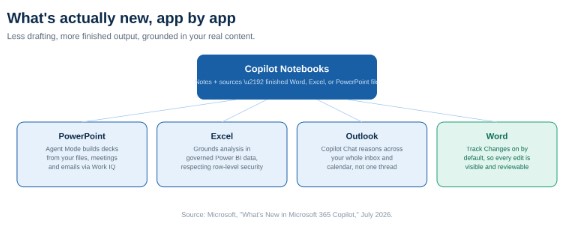
Copilot’s newest updates share one theme: less drafting, more finished output, grounded in your real content.
Copilot Notebooks: your new everyday workspace. According to Microsoft’s official Copilot Notebooks documentation, a notebook can take the notes, files, and sources you have gathered and generate a Word document, an Excel spreadsheet, or a PowerPoint deck directly from that content, complete with an interactive mind map of key topics and relationships. Microsoft describes this as a shift from reviewing notebook content as linear notes to exploring it as a grounded, visual map you can click through for summaries and follow-up questions. This is genuinely new territory for Copilot: not a single-prompt answer, but a workspace that holds your research and produces a finished artifact from it.
PowerPoint Agent Mode: decks built from what you actually have. Microsoft’s own support documentation describes PowerPoint Agent Mode as an AI-powered assistant, accessed from the Copilot Chat ribbon, that understands document context, performs multi-step tasks, and generates or edits content directly inside PowerPoint, grounded in Work IQ rather than a generic topic prompt. Microsoft’s release notes specifically confirm that Agent Mode now lets users create presentations based on their own Work IQ context. The output reflects your real content and context, not a plausible-sounding template.
Excel: analysis grounded in trusted data, not manual copy-paste. According to Microsoft’s Tech Community release announcement, Copilot in Excel now works directly with underlying Power BI report data while respecting existing row-level security, eliminating the need to export data, manually copy and reconcile figures, or switch between Power BI and Excel to check a number. Answers come from your organization’s actual governed metrics, not a manual reconstruction of them.
Outlook: reasoning across your whole inbox, not one thread. Microsoft’s official release notes state that Copilot Chat in Outlook is expanding from reasoning over a single email thread to reasoning over a user’s entire inbox, calendar, meetings, and other enterprise data already available through Microsoft 365, without requiring a separate Microsoft 365 Copilot license for the base experience. That is a meaningfully bigger scope for anyone using it to catch up, prioritize, or prepare for a day of meetings.
Word: transparent edits you can actually review. Microsoft’s official product update confirms that new review workflows let Copilot edit documents with Track Changes turned on, so every proposed revision is visible by default, and users can also ask Copilot to add, read, reply to, and manage comments directly. Nothing is a silent rewrite you have to compare by hand.
Not sure which of these updates are actually turned on in your tenant?
In a free 30-minute consultation, Cloud 9 Infosystems will check your Copilot configuration, identify which of these capabilities your team can start using today, and build a short rollout plan to drive real adoption.
How to Start Using This Today
None of this requires a formal project to begin benefiting from it. A practical first pass looks like this:
- Try a Copilot Notebook on your next research task. Drop your notes and source files into a notebook and ask it to produce the document, sheet, or deck you actually need, rather than assembling it by hand.
- Let PowerPoint Agent Mode build your next internal deck. Point it at the meetings, files, and emails behind a real project instead of starting from a blank template.
- Ground your next Excel question in Power BI data. If your organization already has governed Power BI reports, ask Copilot in Excel to analyze against them directly instead of exporting a copy.
- Turn on Track Changes for Copilot edits in Word. Make AI-assisted editing something your team can see and approve, not a black box.
The updates themselves are free to try for most licensed users. What most organizations are missing is not access, it is awareness and a habit of using them. That is exactly where a structured adoption push, not just a license purchase, makes the difference. Cloud 9 Infosystems has spent 16-plus years helping US businesses turn Microsoft 365 licenses into real productivity gains across healthcare, financial services, and enterprise IT, including our guide to Microsoft Copilot agents and workflow automation.
The Bottom Line for IT and Business Leaders
Most organizations are sitting on Copilot capability their employees have never seen, let alone used. The gap between what Microsoft has shipped and what your team actually knows about is often wider than the gap between what your team wants and what your license already includes.
The return on your Copilot investment does not come from the next feature release. It comes from closing that awareness gap, one team, one workflow, at a time.
Frequently Asked Questions
What are Copilot Notebooks in Microsoft 365?
Copilot Notebooks are a workspace where you can gather notes, files, and sources, then ask Copilot to turn that content directly into a finished Word document, Excel workbook, or PowerPoint deck, along with a mind map summarizing what the notebook contains.
What is PowerPoint Agent Mode?
PowerPoint Agent Mode builds a presentation grounded in your own files, meetings, and emails through Work IQ, rather than generating generic slides from a topic alone. The result reflects your actual project content and context.
How does Copilot in Excel use Power BI data?
Copilot in Excel can now ground its analysis directly in governed Power BI data while respecting existing row-level security. This lets users get answers from trusted business metrics without exporting data or manually reconciling figures between Power BI and Excel.
Do I need a new license to use these Copilot updates?
Most of these capabilities are available to existing Microsoft 365 Copilot users as they roll out, rather than requiring a new license tier. The bigger barrier for most organizations is awareness and adoption, not licensing.
How is Copilot in Outlook different now?
Copilot Chat in Outlook has expanded from answering questions about a single email thread to reasoning across an entire inbox and calendar, making it useful for broader tasks like catching up after time away or preparing for a full day of meetings.
How can my organization get more value out of Copilot?
Most organizations already have access to more Copilot capability than their employees are actively using. A structured review of your current configuration, paired with focused training on features like Notebooks, Agent Mode, and data-grounded analysis, typically drives more value than purchasing additional licenses.
Ready to Close the Gap Between Your Copilot License and What Your Team Actually Uses?
Cloud 9 Infosystems will review your current Microsoft 365 Copilot setup, identify which of these new capabilities are already available to your team, and build a practical adoption plan to turn licenses into real productivity.
Recent Posts

FabCon Europe 2026: What Fabric IQ and Data Agents Mean for Your Business
Fabric IQ in Microsoft Copilot is now generally available and on by default. Learn what it means for Power BI, its current limits, and a 6-step plan to get your semantic models ready.

Azure Virtual Desktop Regional Host Pools Are Now GA. Here Is Why Your Next Host Pool Should Be Regional.
Azure Virtual Desktop regional host pools are now generally available. Learn how they improve resiliency, reduce shared regional dependencies, support data sovereignty, and help IT teams build stronger AVD disaster recovery designs.

Generative AI Data Security: How to Prepare Microsoft 365 Before You Roll Out Copilot
Generative AI data security starts with securing the data Microsoft 365 Copilot can access. Learn how to fix oversharing, protect sensitive content, control AI use and prepare your Microsoft 365 environment for a safer Copilot rollout.

Join Us on the Journey to Transforming Futures - Contact Us!
Schedule a meeting with our experts or fill out the form for a free assessment of your environment today!


*Cloud 9 reserves the right for free assessment eligibility.