
Microsoft Copilot Agents Are Quietly Rewriting How Work Gets Done
The biggest productivity drain in most organizations isn’t the work itself it’s everything that happens between the work. Here’s how Copilot Agents close that gap, and how to roll them out without losing control.
Your people probably aren’t the bottleneck the space between your tools is. Approvals sit in inboxes. Status updates arrive late. Data gets re-keyed by hand from one system into the next. Each task feels trivial on its own. Added up across a week, they’re the friction that quietly slows everything down.
Microsoft Copilot Agents are designed to remove that friction. Instead of only helping someone draft an email or summarize a meeting, an agent can move the work itself forward—pulling the right context, running the repeatable steps, routing approvals, and returning only when a real decision is needed. For teams already operating in a structured Microsoft cloud environment, it’s a natural next step.
THE SHORT VERSION
- Microsoft 365 Copilot assists; a Copilot Agent acts—it can start and run multi-step work on its own.
- The fastest wins are repetitive, daily, measurable tasks: inbox triage, quotes, onboarding, finance exceptions, ops alerts.
- Agents are built in Copilot Studio and run across Microsoft 365, Azure, and the Power Platform.
- Treat agents like production systems: least privilege, approvals, and audit logging from day one.
Why Work Feels Slower Than It Should
Most organizations rely on a handful of disconnected tools to get anything done. Requests arrive through Outlook, collaboration happens in Teams, files live in SharePoint, and approvals and transactions run in separate systems again.
That fragmentation is where the delays hide. Every step depends on a person manually carrying information from one place to the next. Even highly capable teams can’t outrun that drag when coordination itself becomes the bottleneck.
Hiring more people rarely fixes a coordination problem. It just adds more handoffs to manage.
This is where a connected ecosystem matters. Platforms like Microsoft 365 and Azure give workflows a single, unified place to operate—so that automation has something solid to stand on before you introduce it.
Assistant or Agent? The Difference That Matters
It’s an easy distinction to blur, but it shapes everything that follows. Microsoft 365 Copilot acts as an assistant: it responds when prompted, helping you create, summarize, and find information across Outlook, Teams, and Word. Copilot Agents go a step further.
Copilot — helps you
Reactive. It responds when prompted—drafting, summarizing, and searching across content you can already see—then waits for your next instruction.
Copilot Agent — acts for you
Proactive. Built in Copilot Studio, it triggers on events, gathers information, runs workflow steps, updates systems, and routes approvals—all within defined permissions.
The shift is subtle but profound: instead of waiting for instructions, workflows start to move on their own within the Microsoft ecosystem.
WATCH
See how agents are actually built—the official Microsoft Copilot Studio channel has short build-alongs, demos, and feature deep dives.
What Changes When Agents Run the Work
When workflows start automatically, the need for constant coordination drops sharply. Gathering data, validating inputs, routing approvals, logging actions—all of it can happen quietly in the background.
Teams stop spending their days shuttling tasks between tools. Instead, they focus on the things that actually need a human: decisions, exceptions, and outcomes. Put simply, you move from coordinating every handoff to supervising results.
The Maturity Path: How Teams Move Forward
Adopting Copilot Agents usually happens in stages, not in one leap. Organizations start by using Microsoft 365 Copilot as an assistant for drafting and summarizing. Next, they introduce agents into structured workflows where human approval is still required. Over time, agents take on more—handling complete workflows and escalating only the exceptions.
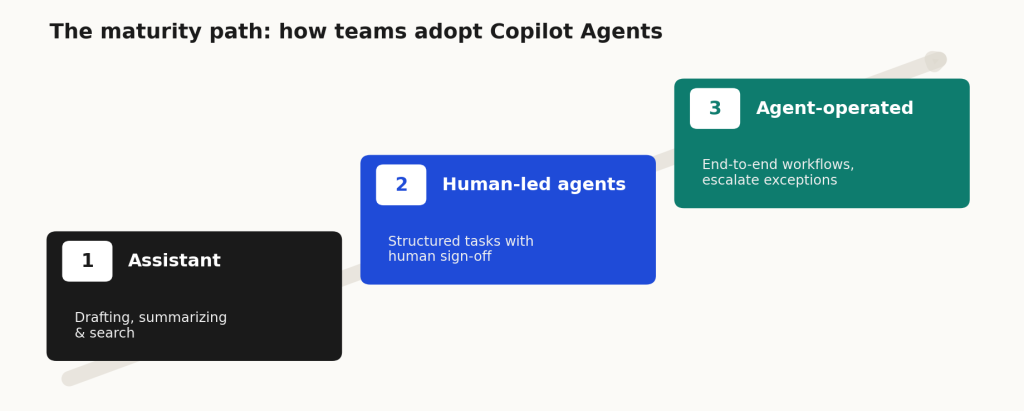
This progression works best when the underlying cloud environment is stable and well governed, so each new step rests on a dependable foundation.
Where Copilot Agents Deliver Immediate Value
Agents create the most impact in workflows that repeat often and span multiple teams. A few that tend to pay off quickly:
- Sales. Monitor a shared inbox, gather pricing details, generate a quote, and initiate approvals using Microsoft tools.
- HR. Streamline onboarding by answering routine questions from structured knowledge stored in your Microsoft environment.
- Finance. Identify discrepancies, assemble the supporting evidence, and route exceptions for review.
- Operations. Monitor signals and alert the right team before a small issue escalates into a real problem.
A Practical Example: From CRM to ERP
One of the most valuable uses of Copilot Agents is automating the flow of data between business systems—for example, moving a finalized contract from CRM into ERP. Rather than relying on manual entry or complex custom integrations, an agent can run the whole routine path:
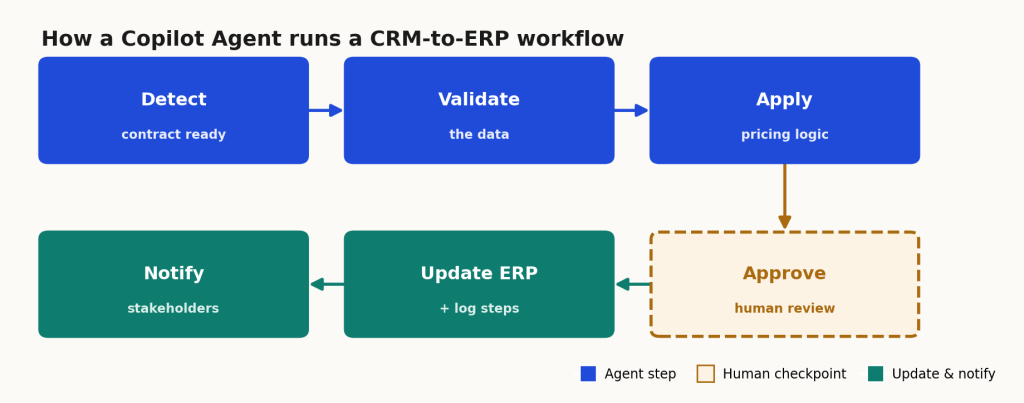
Humans stay in the loop for approvals and edge cases; everything else simply runs. Within a structured Microsoft ecosystem supported by Cloud 9 Infosystems’ Managed Services, the process becomes both efficient and fully auditable.
Governance Matters From Day One
Copilot Agents deserve the same discipline as any production system: defined permissions, clear data boundaries, and full visibility into every action. Microsoft provides strong identity and compliance controls through Microsoft Entra ID and Microsoft 365.
Combined with Cloud 9 Infosystems’ governance-driven managed services model, those controls let you scale automation confidently—without trading away security or compliance.
Are You Ready to Introduce Copilot Agents?
Before building anything, it’s worth a quick gut check. The teams that succeed tend to have three things in place:
- A clear, repetitive workflow in mind
- A named owner who can supervise outcomes and exceptions
- A secure cloud foundation built on Microsoft platforms
If those elements are already there, starting with one focused use case lets you validate the results and expand with confidence.
Frequently Asked Questions
What are Microsoft Copilot Agents?
AI-powered tools that automate workflows across Microsoft 365 and Azure by executing tasks such as data collection, approvals, and system updates.
How are Copilot Agents different from Microsoft 365 Copilot?
Microsoft 365 Copilot assists with content and insights. Copilot Agents go further—they automate workflows and execute tasks across Microsoft applications.
Where are Copilot Agents built?
In Microsoft Copilot Studio, integrating with Microsoft 365, Azure, and the Power Platform.
What are the best use cases for Copilot Agents?
Inbox automation, quote generation, onboarding workflows, financial reconciliation, and operational alerts.
Are Microsoft Copilot Agents secure?
Yes—when implemented with Microsoft Azure and Microsoft 365 controls such as role-based access, approvals, and audit logging.
Do you need Managed Services to use Copilot Agents?
Not strictly, but Cloud 9 Infosystems’ Microsoft Cloud Managed Services help ensure a secure, well-integrated environment to build on.
How do Copilot Agents improve productivity?
They automate repetitive tasks and workflows, cutting manual effort so teams can focus on decisions and high-value work.
What is the first step to implement Copilot Agents?
Start with a clearly defined, repetitive workflow in Microsoft 365 or Azure, and make sure governance and security are in place.
Ready to Put Routine Workflows on Autopilot?
For organizations already using Microsoft Azure and Microsoft 365, this is the logical next step—turning integrated systems into intelligent, self-driven workflows. We’ll help you find the right first workflow and build a scalable Copilot strategy.
Recent Posts
Latest Blogs

FabCon Europe 2026: What Fabric IQ and Data Agents Mean for Your Business
Fabric IQ in Microsoft Copilot is now generally available and on by default. Learn what it means for Power BI, its current limits, and a 6-step plan to get your semantic models ready.

Azure Virtual Desktop Regional Host Pools Are Now GA. Here Is Why Your Next Host Pool Should Be Regional.
Azure Virtual Desktop regional host pools are now generally available. Learn how they improve resiliency, reduce shared regional dependencies, support data sovereignty, and help IT teams build stronger AVD disaster recovery designs.

Generative AI Data Security: How to Prepare Microsoft 365 Before You Roll Out Copilot
Generative AI data security starts with securing the data Microsoft 365 Copilot can access. Learn how to fix oversharing, protect sensitive content, control AI use and prepare your Microsoft 365 environment for a safer Copilot rollout.