

Microsoft 365 Copilot July 2026 Updates: New AI Models, Smarter Workflows and Enterprise Automation
Microsoft continues to expand the capabilities of Microsoft 365 Copilot with its July 2026 release, bringing powerful new AI models, advanced workflow automation, deeper Microsoft 365 integrations and enhanced governance features for enterprises. These updates further position Microsoft 365 Copilot as a strategic AI platform that helps organizations streamline operations, improve employee productivity and accelerate digital transformation.
The Evolution of Microsoft 365 Copilot
As organizations increasingly adopt generative AI to support knowledge workers, businesses need solutions that combine intelligence, security and business context. Microsoft’s July 2026 updates address these requirements through improved reasoning models, expanded automation features and richer integration with enterprise data sources.
New support for GPT-5.6 and Anthropic models enables users to tackle sophisticated business processes ranging from document creation and data analysis to presentation development and workflow execution.
Major Enhancements Introduced in July 2026
1. Advanced AI Models for Better Business Outcomes
Microsoft has introduced:
- GPT-5.6 for enhanced reasoning and content generation.
- Claude Sonnet 5 for agentic, multi-step work.
- Claude Fable 5 for complex and long-duration workflows.
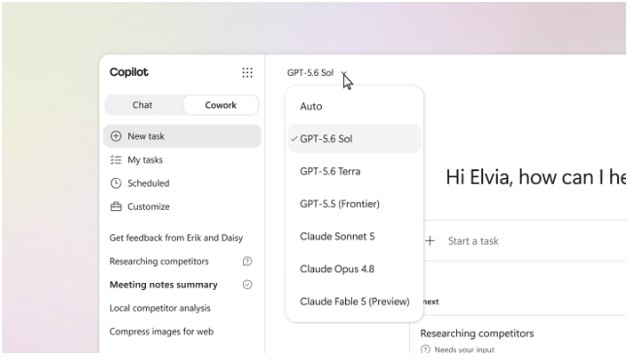
Microsoft 365 Copilot expands model choice with GPT-5.6, Claude Sonnet 5 and Claude Fable 5.
These models provide stronger contextual awareness and improve how Copilot supports real-world business scenarios.
2. Smarter Automation with Copilot Cowork
One of the most impactful updates is the expansion of Copilot Cowork capabilities.
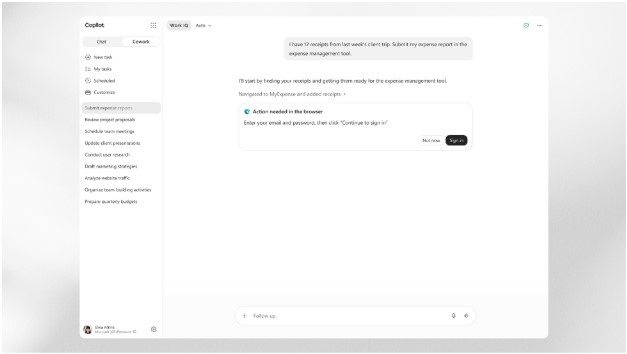
Copilot Cowork enables browser automation and event-driven workflows.
New features include:
- Browser automation through Microsoft Edge.
- Event-triggered automated tasks.
- Custom skills and plugin support.
- Extended workflow orchestration capabilities.
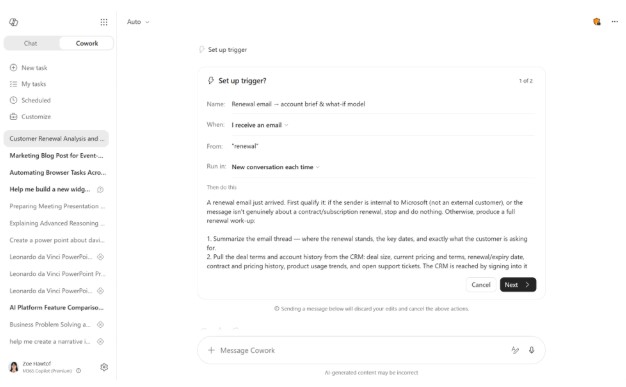
Organizations can automate repetitive business processes while maintaining alignment with business context and governance requirements.
3. Enhanced Productivity Across Microsoft 365 Apps
Microsoft Word
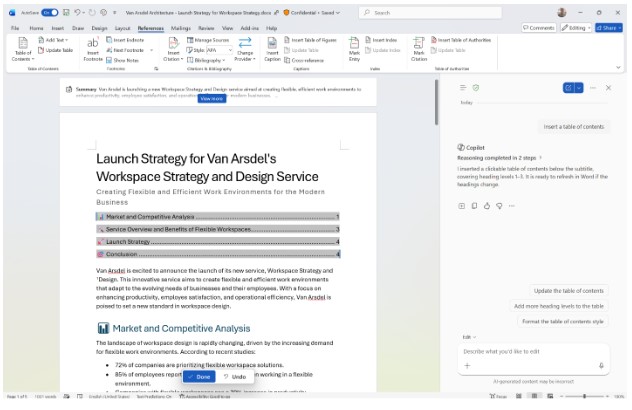
Copilot helps streamline document review and collaboration.
Copilot now supports advanced review workflows, document formatting automation, comment management and table of contents generation.
Microsoft Excel
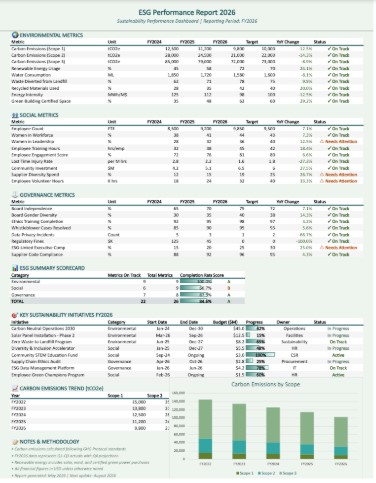
Users can:
- Apply corporate branding automatically.
- Use theme design capabilities.
- Analyze governed Power BI data directly within Excel.
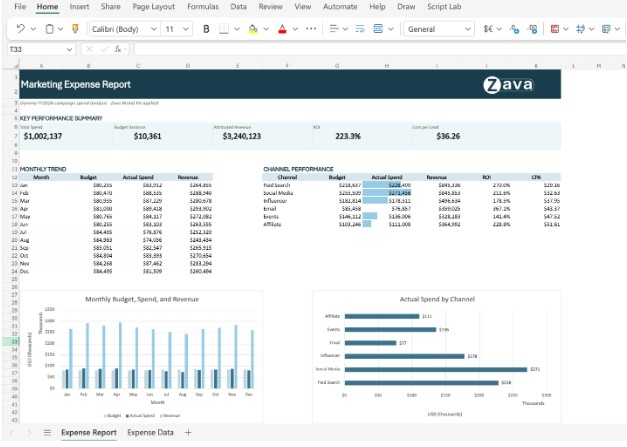
Copilot in Excel now works with governed Power BI data and branded workbook design.
Microsoft PowerPoint
New capabilities include:
- Brand kit integration.
- Custom reusable skills.
- AI-powered comment management.
- Presentation generation using existing decks as visual references.
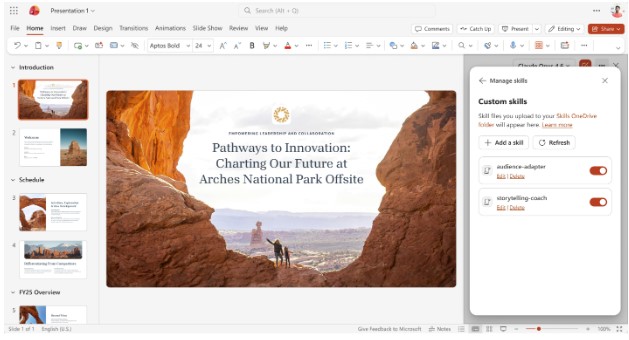
Create brand-consistent presentations using existing slide decks as design references
4. Improved Collaboration with Microsoft Teams
The new Meeting Recaps application centralizes AI-generated meeting summaries, enabling employees to quickly review discussions, decisions and action items without manually navigating individual meetings.
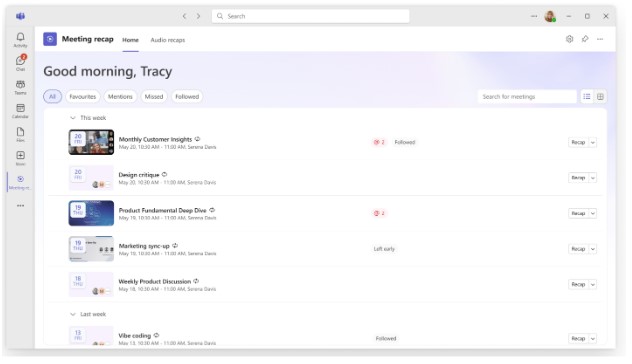
A dedicated Meeting Recaps experience helps users quickly catch up on key discussions.
5. Expanded Enterprise Knowledge with Copilot Connectors
Microsoft has significantly expanded Copilot connectors, enabling access to industry-specific information across sectors such as:
- Financial Services
- Manufacturing
- Healthcare
- Professional Services
- Technology
- Retail
By connecting organizational knowledge with Copilot, businesses can improve the relevance and accuracy of AI-generated insights.
Governance and Security Enhancements
Enterprise adoption requires robust governance.
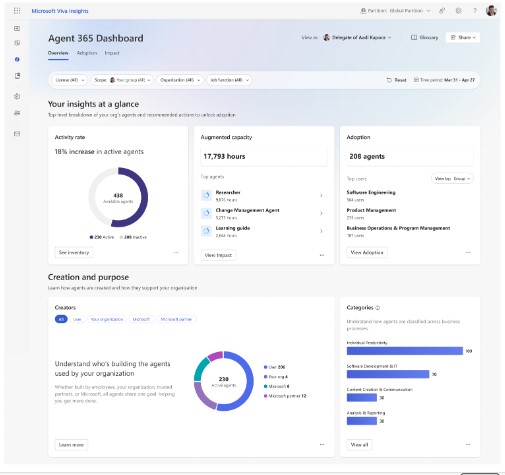
New reporting and governance controls provide visibility into Copilot adoption and usage.
Microsoft introduced several key administrative improvements:
- Domain exclusion controls for web-grounded responses.
- Expanded Data Loss Prevention (DLP) protections.
- Enhanced adoption analytics and reporting.
- Connector usage reporting.
- Improved AI cost monitoring and budget controls.
These capabilities help organizations scale AI responsibly while maintaining security, compliance and operational oversight.
Business Benefits of the July 2026 Release
Organizations adopting these features can expect:
- Faster content creation and review cycles.
- Improved employee efficiency.
- Reduced manual effort through automation.
- Better use of enterprise business data.
- Enhanced governance and compliance management.
- Stronger ROI from Microsoft 365 investments.
How Cloud 9 Infosystems Can Help
Successfully implementing Microsoft 365 Copilot requires more than licensing. Organizations need a strategy covering adoption, governance, security, change management and business process optimization.
Cloud 9 Infosystems helps businesses:
- Assess Microsoft 365 Copilot readiness.
- Establish AI governance frameworks.
- Integrate business data sources and connectors.
- Build automation workflows and custom agents.
- Accelerate organization-wide Copilot adoption.
For implementation best practices and technical guidance, organizations should also leverage Microsoft Learn resources related to Microsoft 365 Copilot.
Conclusion
The July 2026 Microsoft 365 Copilot release demonstrates Microsoft’s commitment to enterprise-grade AI innovation. With stronger models, expanded automation, richer data integrations and enhanced governance controls, organizations now have more tools than ever to transform how employees work and collaborate.
Your Next Step
Ready to maximize the value of Microsoft 365 Copilot across your organization?
Connect with Cloud 9 Infosystems to explore Copilot readiness assessments, governance strategies, AI adoption programs and enterprise productivity transformation initiatives powered by Microsoft AI technologies.

Frequently Asked Questions
1. What are the biggest Microsoft 365 Copilot updates released in July 2026?
Microsoft 365 Copilot’s July 2026 release introduced several major enhancements, including GPT-5.6 integration, Claude Sonnet 5 and Claude Fable 5 models, Copilot Cowork automation, Power BI-powered Excel analysis, improved PowerPoint capabilities, Teams Meeting Recaps, expanded Copilot Connectors and new governance controls for administrators. These updates help organizations improve productivity, collaboration and decision-making.
2. How does GPT-5.6 improve Microsoft 365 Copilot?
GPT-5.6 enhances Microsoft 365 Copilot by providing stronger reasoning, better handling of multi-step tasks and more accurate content generation. Users can create richer documents in Word, perform deeper analysis in Excel, build more compelling presentations in PowerPoint and generate more contextual responses in Copilot Chat.
3. What is Copilot Cowork and how does it help businesses?
Copilot Cowork is Microsoft’s AI-powered workspace designed to handle complex workflows and automation tasks. In the July 2026 update, Cowork gained browser automation, event-triggered tasks, customizable skills and plugin support, enabling users to automate repetitive business processes across web applications, Teams, Outlook and other business tools.
4. Can Microsoft 365 Copilot analyze Power BI data in Excel?
Yes. Microsoft 365 Copilot can now work directly with governed Power BI data inside Excel. Users can connect Power BI reports and ask Copilot to identify trends, analyze performance and generate insights while respecting existing security and data access controls. This reduces manual data exports and improves decision-making accuracy.
5. What new features are available in Copilot for PowerPoint?
The July 2026 update introduced several PowerPoint enhancements, including branded asset integration, custom skills, AI-powered comment management, reference deck-based presentation creation and enhanced mobile capabilities. These features help users create professional, brand-compliant presentations more efficiently.
6. How does the Teams Meeting Recaps app improve collaboration?
The new Meeting Recaps app in Microsoft Teams centralizes AI-generated meeting summaries in one location. Employees can quickly review meeting discussions, key decisions, action items and highlights without searching through individual meeting chats or recordings, improving collaboration and productivity.
7. What are Microsoft 365 Copilot Connectors?
Microsoft 365 Copilot Connectors allow organizations to connect external business systems and knowledge sources to Copilot. These connectors enable Copilot to access industry-specific data from financial services, healthcare, manufacturing, professional services, retail and other sectors while maintaining existing security and compliance controls.
8. What governance and security updates were introduced for Microsoft 365 Copilot?
Microsoft introduced several governance enhancements, including domain exclusion for web grounding, expanded Data Loss Prevention (DLP) capabilities, Copilot Connectors usage reporting, agent adoption analytics and improved AI cost management controls. These features help organizations deploy AI securely and responsibly at scale.
9. How can organizations improve Microsoft 365 Copilot adoption?
Organizations can maximize Microsoft 365 Copilot adoption by implementing user training, establishing AI governance policies, integrating business data sources, enabling relevant Copilot features and monitoring usage through adoption analytics and reporting tools. A structured adoption strategy helps drive measurable productivity gains and return on investment.
10. Why should businesses upgrade their Microsoft 365 Copilot strategy in 2026?
As Microsoft 365 Copilot gains more advanced AI models, workflow automation capabilities and enterprise integrations, businesses that actively adopt these innovations can improve employee productivity, streamline business processes, enhance collaboration and gain faster access to business insights. The July 2026 update demonstrates Microsoft’s continued investment in enterprise AI transformation.
11. How can Cloud 9 Infosystems help with Microsoft 365 Copilot implementation?
Cloud 9 Infosystems helps organizations successfully adopt Microsoft 365 Copilot through readiness assessments, governance planning, security and compliance reviews, user adoption programs, custom agent development, workflow automation and Microsoft 365 optimization services. This ensures businesses achieve maximum value from their Copilot investment.
Ready to Close the Gap Between Your Copilot License and What Your Team Actually Uses?
Cloud 9 Infosystems will review your current Microsoft 365 Copilot setup, identify which of these new capabilities are already available to your team, and build a practical adoption plan to turn licenses into real productivity.
Recent Posts

FabCon Europe 2026: What Fabric IQ and Data Agents Mean for Your Business
Fabric IQ in Microsoft Copilot is now generally available and on by default. Learn what it means for Power BI, its current limits, and a 6-step plan to get your semantic models ready.

Azure Virtual Desktop Regional Host Pools Are Now GA. Here Is Why Your Next Host Pool Should Be Regional.
Azure Virtual Desktop regional host pools are now generally available. Learn how they improve resiliency, reduce shared regional dependencies, support data sovereignty, and help IT teams build stronger AVD disaster recovery designs.

Generative AI Data Security: How to Prepare Microsoft 365 Before You Roll Out Copilot
Generative AI data security starts with securing the data Microsoft 365 Copilot can access. Learn how to fix oversharing, protect sensitive content, control AI use and prepare your Microsoft 365 environment for a safer Copilot rollout.

Join Us on the Journey to Transforming Futures - Contact Us!
Schedule a meeting with our experts or fill out the form for a free assessment of your environment today!


*Cloud 9 reserves the right for free assessment eligibility.