

Microsoft Teams Bot Protection: Who’s Really in Your Meeting?
WHAT YOU WILL LEARN
- Why unmanaged AI meeting bots are a security and privacy risk
- What Microsoft Teams bot protection actually does
- How the meeting lobby now handles suspected bots
- A practical checklist to govern meeting bots in your tenant
THE SHORT VERSION
- The problem: AI note-takers and third-party bots are joining Teams meetings no one intended to invite, sometimes recurring automatically after a single connection.
- The risk: unexpected bots in sensitive meetings can record everything and send your data outside your tenant.
- The fix: Microsoft Teams bot protection detects suspected bots, holds them in the lobby, labels them, and requires explicit organizer approval before they join.
- The real win: the one-click admit shortcut is removed for identified bots, so admitting one becomes a deliberate, logged decision.
Why Unmanaged Meeting Bots Are a Security Risk
AI note-taking is now a normal part of meetings, helping people stay present while details get captured. But as these tools spread, a new problem showed up.
Bots are joining meetings no one invited them to. According to Microsoft, after someone connects a third-party service once, its bot can keep joining future meetings automatically, an unmanaged, non-human participant quietly sitting in.
In sensitive meetings, that is a real exposure. An HR investigation, a board discussion, a deal under NDA, an unexpected bot may record it all and store transcripts on an external cloud your security team never vetted.
The risk is not just that a bot is listening. It is that your data can leave your tenant before anyone realizes a non-human was in the room.
This is the shadow-AI version of a familiar problem, and it belongs in the same conversation as AI agent security and Zero Trust.
How Microsoft Teams Bot Protection Works
Microsoft has introduced a new Teams admin policy, “Manage external bots and their access to meetings,” that gives organizations more visibility and control over external bots.
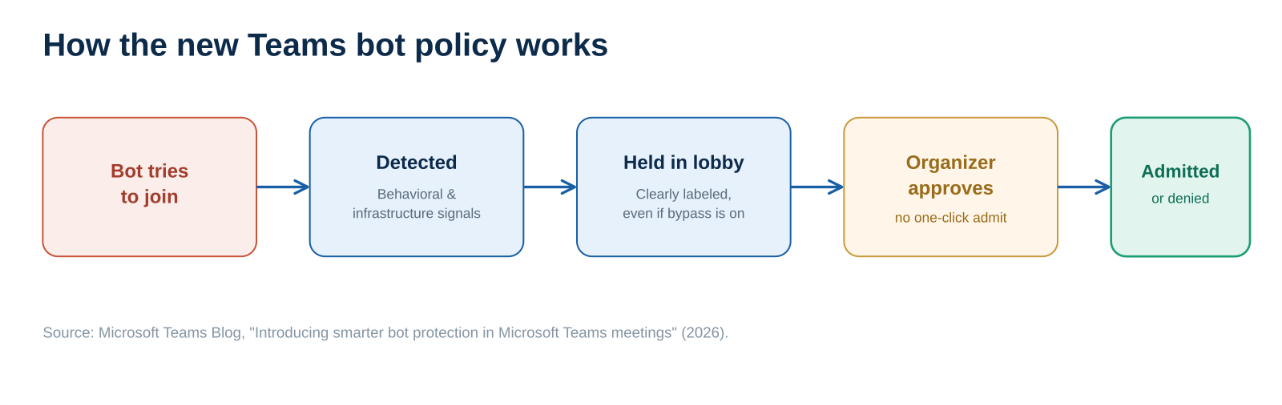
How Microsoft Teams bot protection handles a suspected bot: detect, hold in the lobby, label, and require explicit approval.
Here is what it does when enabled:
- Detects potential bots using behavioural and infrastructure signals.
- Holds them in the meeting lobby, even when participants are normally allowed to bypass it.
- Labels them clearly, so organizers can tell a bot from a person.
- Requires approval from the organizer before the bot can join.
It is targeted, not blunt. The policy can be assigned to individual users or specific groups in the Teams Admin Center. Microsoft is also retiring the older CAPTCHA-based verification in Favor of this more accurate, signal-based model.
The most important change is the workflow. For identified bots, Microsoft removes the one-click admit shortcut and warns organizers when an “admit all” action would let a bot in. As Microsoft puts it, admitting a bot should be a deliberate decision, not a mistake.
Why the Workflow Change Matters More Than Detection
It is tempting to focus on detection accuracy, but the more durable improvement is the workflow.
Detection will never be perfect. Determined operators can try to evade it. But a default that forces a deliberate, logged approval before any bot enters a call closes a whole class of mistakes, no matter how good the detection is underneath.
This closes a real attack path. Microsoft has separately warned about attackers abusing external Teams collaboration, impersonating IT or helpdesk staff to trick employees. Moving the approval to the lobby is a pragmatic fix, the same governance-first thinking behind our Agentic AI Readiness Checklist for 2026.
Not sure which bots are joining your meetings today?
In a free 30-minute consultation, Cloud 9 Infosystems will review your Teams and Microsoft 365 governance posture, help you enable Microsoft Teams bot protection with the right lobby controls, and tighten the settings that keep sensitive conversations private.
What Is Coming Next for Teams Bot Protection?
This is a first step, and Microsoft has signalled more control is on the way:
- Allow-lists for approved bots.
- Organization-wide policies to block external bots entirely.
- Admin reports and audit logs covering bot detection and presence.
- A registration path so legitimate meeting-tool vendors can identify their bots.
The direction is clear. Meetings are becoming spaces where non-human participants are expected, but only when the organization can prove they were supposed to be there. Treat these coming allow-lists and audit logs as core governance features to plan for, not optional extras.
Your Teams Bot Governance Checklist
You can get ahead of this now. A sensible first pass:
- Enable Microsoft Teams bot protection. Turn on “Manage external bots and their access to meetings” in the Teams Admin Center, scoped to the right users and groups.
- Lock down lobby admission. Set “Who can admit from lobby” to organizers and co-organizers, so an attendee cannot wave in an unwanted bot.
- Educate your organizers. Make clear the new bot labels and lobby prompts are protection, not Teams misbehaving, so people do not reflexively approve.
- Review meeting hygiene. Audit which third-party meeting services are connected and tighten policies around sensitive meetings.
- Plan for the roadmap. Prepare to use allow-lists, audit logs, and reporting as they arrive, and register any in-house meeting bots.
This is exactly the kind of governance an experienced Microsoft partner can operationalize fast. Cloud 9 Infosystems has spent 16-plus years helping US enterprises secure the Microsoft cloud across healthcare, financial services, and enterprise IT, from security monitoring with Microsoft Sentinel to secure enterprise AI.
The Bottom Line for IT Leaders
The future of meetings is not human-only. It is human-supervised, with AI participants that must be approved rather than assumed.
Microsoft Teams bot protection is a pragmatic step toward that: it moves the decision to the door, where organizers can see what is asking to come in. Enable the policy, tighten your lobby settings, and prepare for the allow-lists and audit logs coming next. Handled well, meeting-bot governance keeps your most sensitive conversations exactly where they belong, inside your tenant.
Microsoft Resources Referenced in This Article
- Introducing smarter bot protection in Microsoft Teams meetings (Microsoft Teams Blog)
- Microsoft Teams admin documentation (Microsoft Learn)
Frequently Asked Questions
What is Microsoft Teams bot protection?
Microsoft Teams bot protection is a new admin policy, “Manage external bots and their access to meetings,” that gives organizations control over external bots in meetings. When enabled, Teams detects potential bots, holds them in the lobby, labels them clearly, and requires the organizer to explicitly approve them before they can join, even in meetings that normally allow lobby bypass.
Why are AI meeting bots a security risk?
AI note-takers and third-party bots can join meetings no one intended to invite, sometimes recurring automatically after a single connection. In sensitive meetings, an unmanaged bot may record the conversation and store transcripts on an external cloud your security team has not vetted, meaning your data can leave your tenant without anyone realizing a non-human was present.
How do I stop bots from joining Teams meetings automatically?
Enable Microsoft Teams bot protection in the Teams Admin Center and set “Who can admit from lobby” to organizers and co-organizers. Identified bots then require explicit approval, and the one-click admit shortcut is removed so a bot cannot be admitted by mistake.
Does Microsoft Teams bot protection block all meeting bots?
Not automatically, and not all of them. The policy detects and holds suspected bots for approval rather than banning them outright, and detection is not guaranteed to catch every bot. Microsoft has said it plans to add allow-lists and organization-wide blocking policies for more granular control.
Will this affect legitimate note-taking tools we use?
Legitimate bots are held in the lobby until an organizer approves them, so approved tools can still join. Microsoft is also introducing a registration path so vendors that build meeting tools can identify their bots, helping organizers distinguish registered bots from suspected threats.
What should IT admins do first?
Enable Microsoft Teams bot protection scoped to the right groups, set lobby admission to organizers and co-organizers, educate organizers about the new prompts, audit connected third-party meeting services, and plan to use allow-lists and audit logs as they become available.
Want to Know Which Bots Are Joining Your Meetings?
Unmanaged AI note-takers can quietly turn sensitive meetings into someone else’s dataset. Cloud 9 Infosystems will review your Teams and Microsoft 365 governance, enable Microsoft Teams bot protection with the right lobby controls, and help you keep confidential conversations inside your tenant.
Recent Posts

Why Most Enterprise AI Stalls, and the 4-Layer System That Fixes It
Discover why most enterprise AI initiatives stall after pilot projects and learn the proven four-layer strategy for building scalable AI systems. Explore governance, context, production readiness, and continuous improvement to achieve lasting AI success.

Microsoft Teams Bot Protection: Who’s Really in Your Meeting?
Discover how Microsoft Teams Bot Protection helps prevent unauthorized AI meeting bots from joining sensitive calls. Learn how lobby controls, bot detection, governance, and Zero Trust policies protect your Microsoft 365 meetings and enterprise data.

Agentic Observability: What It Means for Your Azure Cloud Operations in 2026
Discover how Agentic Observability uses AI to transform Azure cloud operations with faster root cause analysis, intelligent monitoring, and secure governance. Learn how Azure Copilot Observability Agent helps IT teams reduce downtime and improve operational efficiency.

Join Us on the Journey to Transforming Futures - Contact Us!
Schedule a meeting with our experts or fill out the form for a free assessment of your environment today!


*Cloud 9 reserves the right for free assessment eligibility.