

Copilot Cowork: What It Is and What GA Means for Your Business in 2026
Ask Copilot to write the quarterly update and it hands you a draft. Ask Copilot Cowork, and it pulls the numbers, writes the update, builds the deck, and sends it, checking in for your approval along the way, even while your laptop is closed.
That is the shift Microsoft just made generally available. Copilot Cowork moves Microsoft 365 from an assistant that helps you work to an agent that does the work, and it changes both how your team operates and how you budget for AI.
Here is what Copilot Cowork actually is, how it differs from Copilot Chat, and what its general availability means for rollout, cost, and governance.
WHAT YOU WILL LEARN
- What Copilot Cowork is and what makes it different
- How it differs from Copilot Chat, and when to use each
- How it works, from your request to a finished deliverable
- What GA changes for pricing, security, and rollout
THE SHORT VERSION
- Copilot Cowork is an agentic system that plans, executes, and delivers complete, multi-step work, returning a finished result rather than a draft or recommendation.
- It is grounded in your real work through Work IQ, runs in the cloud so tasks continue even when your device is off, and pauses for your approval at key checkpoints.
- It is now generally available. Cowork requires a Microsoft 365 Copilot license plus usage-based billing, measured in Copilot Credits and managed in the new Cost Management dashboard.
- It inherits Microsoft 365 security and compliance, with Microsoft Purview controls extended to Cowork.
What Is Copilot Cowork?
Copilot Cowork is an agentic system built into Microsoft 365 Copilot that completes complex, long-running, multi-tool tasks from start to finish. You describe the outcome you want, and Cowork plans the steps, does the work across your apps, and returns a finished artifact, a document, deck, report, or set of sent messages, rather than a draft you still have to build out.
Five things make Cowork distinct, according to Microsoft. It is cloud-hosted, so your files are not stored on the device, and tasks keep running even when your laptop is off. It is grounded in Work IQ, so the work reflects your real context. It inherits enterprise-grade security and compliance inside your Microsoft 365 trust boundary. And it is multi-model, so it can use the model best suited to each task.
In short, where Copilot Chat answers, Cowork acts. That distinction is the heart of the agentic shift we have been tracking in our work on agentic AI digital workers for enterprises.
How Is Copilot Cowork Different from Copilot Chat?
This is the question most teams ask first, and the answer is simple: Chat is for answers, Cowork is for action.
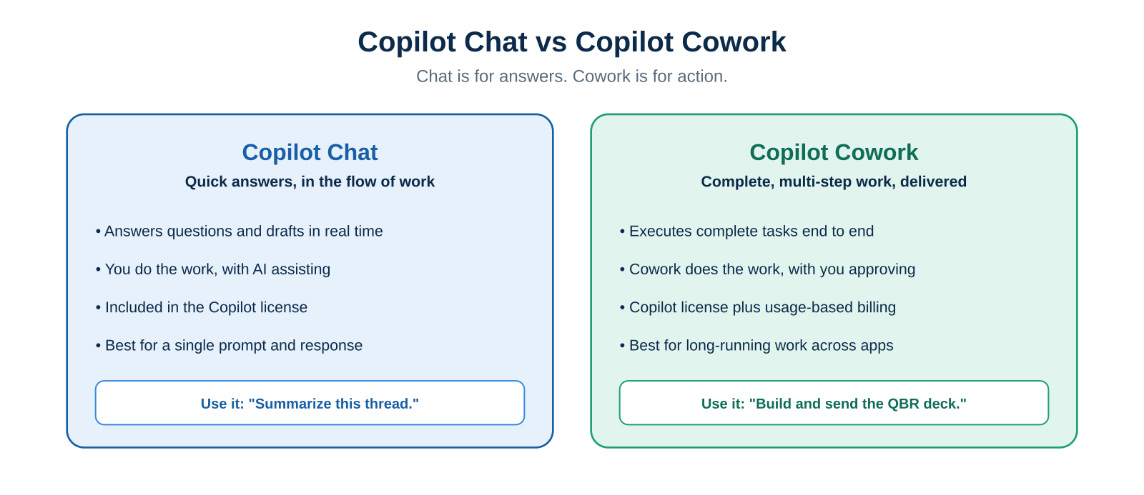
Copilot Chat answers questions in the flow of work. Copilot Cowork delivers finished, multi-step work.
Copilot Chat is best for quick answers and back-and-forth in the flow of your work: summarize this thread, draft a reply, explain this spreadsheet. Copilot Cowork is best when the work spans multiple steps and apps: drafting, planning, coordinating, and producing finished artifacts you can review and ship.
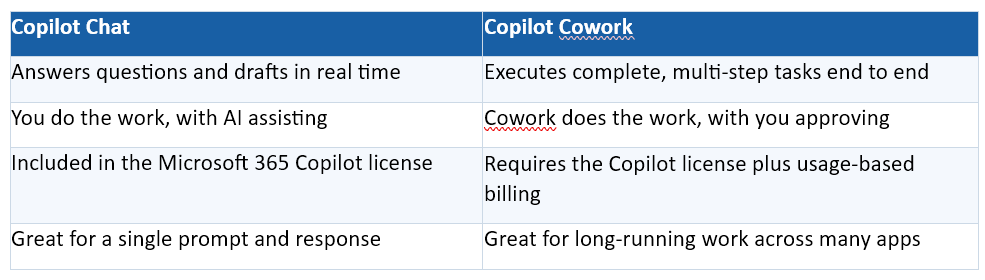
The practical rule of thumb: reach for Chat when you need a quick answer, and hand a whole task to Cowork when you would otherwise spend an hour stitching one together yourself.
How Does Copilot Cowork Work?
Cowork follows a consistent pattern from your request to a finished result, with you in control at each checkpoint.
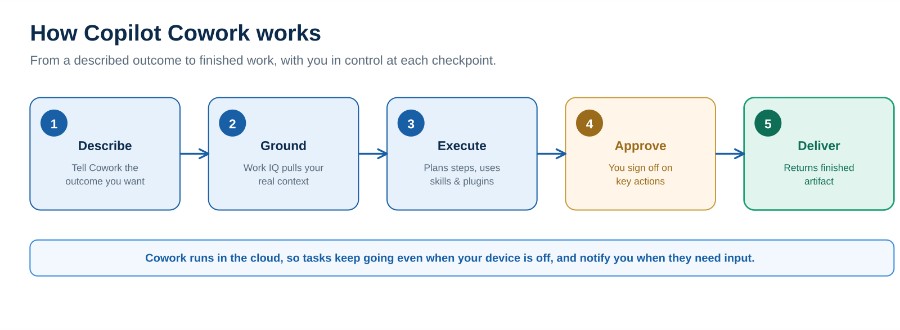
How Copilot Cowork turns a described outcome into finished work, with approval checkpoints along the way.
You describe the outcome. Instead of clicking through steps, you tell Cowork what you want, in plain language.
Cowork grounds the task in Work IQ. It draws on your emails, meetings, files, and business data so the work reflects real organizational context, not generic output.
It plans and executes. Cowork picks the right built-in skills, such as Word, Excel, PowerPoint, PDF, scheduling, and enterprise search, and works through the steps. It can use partner plugins and even custom skills your organization builds.
You approve, then it delivers. Cowork pauses for your approval at key actions, such as sending an email, then returns the finished artifact. Because it runs in the cloud, it keeps working when you step away and can notify you when a long task needs input or is complete.
If you are still building the foundations for this kind of autonomous work, our Agentic AI Readiness Checklist for 2026 is a practical place to start.
Not sure how Copilot Cowork fits your team?
In a free 30-minute consultation, Cloud 9 Infosystems will map the tasks worth delegating to Cowork, set up the right cost and governance guardrails, and build a rollout plan that fits your organization.
What Does GA Change? Pricing and Cost Control
The biggest practical change at general availability is how Cowork is billed. Everyday Copilot stays on a predictable per-user license. Cowork adds usage-based billing on top, denominated in Copilot Credits, because long-running agentic work consumes real compute.
Microsoft calculates the cost of each task from four inputs: the model it uses, how much context it retrieves, how many tools it calls, and how long it runs. A quick, single-step task is inexpensive; a long, multi-tool task grounded across your whole mailbox sits at the higher end.
That variability makes cost management essential, which is why GA ships with a Cost Management dashboard in the Microsoft 365 admin centre for setting budgets, alerts, and limits. We cover how to forecast and control this spend in depth in our Microsoft AI cost management playbook. Because pricing details evolve, confirm the current model against Microsoft’s official documentation before you commit.
Is Copilot Cowork Secure and Governed?
Yes, and this is where being built into Microsoft 365 matters most. Cowork operates within your existing Microsoft 365 trust boundary and inherits the same enterprise security, privacy, and compliance protections as Microsoft 365 Copilot.
Crucially, Microsoft Purview controls extend to Cowork. That includes sensitivity label inheritance, audit logging, eDiscovery, data lifecycle management, and insider risk management for Cowork interactions, so you govern agentic work with the same tools you already use. And because Cowork pauses for approval at key actions, a human stay in the loop for the decisions that matter.
Governance is not an afterthought here, it is the foundation, which is the same principle behind our approach to AI agent security and Zero Trust.
How Should You Roll Out Copilot Cowork?
You do not need to turn it on for everyone at once. A pragmatic path looks like this:
- Enable it deliberately. An admin turns Cowork on and configures usage-based billing, so nothing runs before your guardrails are in place.
- Set budgets and limits first. Use the Cost Management dashboard to set spending limits at the tenant, group, and user level before you scale.
- Start with high-value tasks. Identify the recurring, multi-step work, status reporting, research, deck preparation, that eats your team’s time, and delegate those first.
- Confirm governance. Verify that your Purview policies, sensitivity labels, and approval steps apply as expected before broad rollout.
This is exactly the kind of rollout an experienced Microsoft partner can accelerate. Cloud 9 Infosystems has spent 16-plus years helping US enterprises adopt Microsoft productivity and AI across healthcare, financial services, and enterprise IT, including our guide to Copilot agents and workflow automation.
The Bottom Line for IT Leaders
Copilot Cowork is a genuine change in what Microsoft 365 can do for your team. It shifts AI from helping people work to completing work on their behalf, with human approval and enterprise governance built in.
The value is real, and so is the need for discipline. The organizations that win will pair Cowork with clear cost controls and governance from day one. Handled well, it gives your people back the hours they spend assembling multi-step work, so they can focus on the decisions only they can make.
Frequently Asked Questions
What is Copilot Cowork?
Copilot Cowork is an agentic system in Microsoft 365 Copilot that completes complex, long-running, multi-step tasks end to end. You describe the outcome, and Cowork plans the steps, works across your apps, and returns a finished deliverable rather than a draft, pausing for your approval at key actions.
How is Copilot Cowork different from Copilot Chat?
Copilot Chat answers questions and drafts content in real time while you do the work. Copilot Cowork does the work for you, executing multi-step tasks across apps and returning finished artifacts. Use Chat for quick answers and Cowork when a task spans multiple steps and apps.
Do I need a special license for Copilot Cowork?
Copilot Cowork requires a Microsoft 365 Copilot license, and Cowork tasks are then billed on a usage basis, measured in Copilot Credits. Everyday Copilot stays on the predictable per-user license, while Cowork’ s long-running work is billed by consumption.
How much does Copilot Cowork cost?
Cost varies by task because it is usage-based. Microsoft calculates each task from four inputs: the model used, the context retrieved, the tools called, and the runtime. Administrators can set budgets, alerts, and limits in the Cost Management dashboard. Confirm current pricing on Microsoft’s official documentation.
Is Copilot Cowork secure?
Yes. Cowork runs within your Microsoft 365 trust boundary and inherits the enterprise security and compliance of Microsoft 365 Copilot. Microsoft Purview controls extend to Cowork, including sensitivity labels, audit logging, and eDiscovery, and Cowork pauses for human approval at key actions.
What can Copilot Cowork do?
Cowork can draft and send emails, create Word, Excel, PowerPoint, and PDF files, schedule meetings and manage calendars, post in Teams, organize files in SharePoint and OneDrive, and conduct deep research, using built-in skills, partner plugins, and custom skills your organization creates.
Ready to Put Copilot Cowork to Work, Without Losing Control?
Copilot Cowork can hand your team back hours of multi-step work, but only if it is rolled out with the right cost and governance guardrails. Cloud 9 Infosystems will identify the tasks worth delegating, configure your budgets and policies, and build a rollout plan that fits your organization.
Recent Posts

FabCon Europe 2026: What Fabric IQ and Data Agents Mean for Your Business
Fabric IQ in Microsoft Copilot is now generally available and on by default. Learn what it means for Power BI, its current limits, and a 6-step plan to get your semantic models ready.

Azure Virtual Desktop Regional Host Pools Are Now GA. Here Is Why Your Next Host Pool Should Be Regional.
Azure Virtual Desktop regional host pools are now generally available. Learn how they improve resiliency, reduce shared regional dependencies, support data sovereignty, and help IT teams build stronger AVD disaster recovery designs.

Generative AI Data Security: How to Prepare Microsoft 365 Before You Roll Out Copilot
Generative AI data security starts with securing the data Microsoft 365 Copilot can access. Learn how to fix oversharing, protect sensitive content, control AI use and prepare your Microsoft 365 environment for a safer Copilot rollout.

Join Us on the Journey to Transforming Futures - Contact Us!
Schedule a meeting with our experts or fill out the form for a free assessment of your environment today!


*Cloud 9 reserves the right for free assessment eligibility.