

What Are Microsoft Cloud Managed Services? A Complete Guide for Business Leaders
Cloud adoption can give organizations greater flexibility, scalability, and access to modern technology. However, moving workloads to the cloud is only one part of the journey. Once Microsoft Azure and Microsoft 365 are in place, businesses still need to monitor performance, control costs, protect identities, manage compliance, respond to incidents, maintain backups, and support users.
This is where Microsoft Cloud Managed Services become valuable.
Microsoft Cloud Managed Services provide ongoing operational support for Microsoft Azure, Microsoft 365, security, identity, governance, cost management, backup, disaster recovery, and user productivity environments. Instead of relying only on an internal IT team to manage every part of the Microsoft cloud, an organization can work with a qualified Microsoft Managed Services Provider to supplement internal capabilities and maintain a more structured cloud operating model.
For business leaders, the purpose is not simply to outsource technical work. The broader objective is to establish clear operational accountability, strengthen cloud governance, and allow internal teams to focus on business priorities rather than routine cloud administration.
THE SHORT VERSION
- Microsoft Cloud Managed Services provide ongoing management, monitoring, support, security, governance, cost optimization, and backup for Azure and Microsoft 365 environments.
- The scope spans six connected areas: Azure operations, Microsoft 365 support, security/compliance/governance, cost management, backup and disaster recovery, and performance/service desk management.
- Managed services don’t replace an internal IT team — they extend it, taking on routine operational work so internal staff can focus on strategic priorities.
- Look for a Microsoft Azure Expert MSP with a discovery-led approach, clear service scope, and a business-focused operating model — not just a list of tools.
What Are Microsoft Cloud Managed Services?
Microsoft Cloud Managed Services refer to the continuous management, monitoring, support, security, and optimization of an organization’s Microsoft cloud environment by a managed services provider.
The scope can include Microsoft Azure infrastructure, Microsoft 365 services, Microsoft Entra ID, Microsoft Teams, SharePoint Online, OneDrive, Exchange Online, backup systems, cloud security tools, compliance policies, cost controls, and service desk support.
A Microsoft Managed Services Provider typically works as an extension of the customer’s internal technology team. The provider may take responsibility for selected cloud functions or manage the complete environment, depending on the organization’s architecture, business requirements, risk profile, service-level expectations, and available internal resources.
Microsoft’s Cloud Adoption Framework treats cloud adoption as an ongoing journey rather than a one-time migration. Its operational methodologies focus on governing, securing, managing, and optimizing workloads after they are running in Azure. This reinforces why long-term operational management is an essential part of successful cloud adoption.
Businesses evaluating operational support can explore Cloud 9’s Microsoft Cloud Managed Services, including Azure operations, Microsoft 365 management, security, governance, backup, disaster recovery, cost optimization, and technical support.
Why Do Businesses Need Microsoft Managed Services?
Microsoft cloud technologies provide organizations with powerful infrastructure, productivity, security, data, and collaboration capabilities. However, organizations still need the right operating processes, technical competencies, and governance controls to use those capabilities effectively.
As cloud environments grow, technology teams often need to manage multiple subscriptions, workloads, user identities, security alerts, policy requirements, support tickets, application dependencies, and licensing decisions. Without a consistent operating model, visibility and accountability can become fragmented.
Microsoft Managed Services help establish defined responsibilities for daily operations. Monitoring schedules, incident escalation paths, identity policies, backup requirements, budget controls, change procedures, and service reporting can be handled through a structured managed services framework rather than addressed only when a problem occurs.
A well-designed managed services engagement should complement internal expertise — assigning routine operations to the provider while employees focus on strategy, transformation, and innovation.
Not sure where your Microsoft cloud environment stands operationally?
What Is Included in Microsoft Cloud Managed Services?
The scope of Microsoft Cloud Managed Services varies according to the provider and the customer’s needs. For an organization using both Azure and Microsoft 365, a comprehensive service may combine infrastructure operations, productivity support, identity management, security, governance, business continuity, financial management, and service desk functions.
Cloud 9’s managed services model brings these responsibilities together across six connected operational areas: Azure operations and monitoring; security, compliance, and governance; backup, disaster recovery, and business continuity; Microsoft 365 operations and support; cost management and optimization; and performance, capacity, and service desk management.
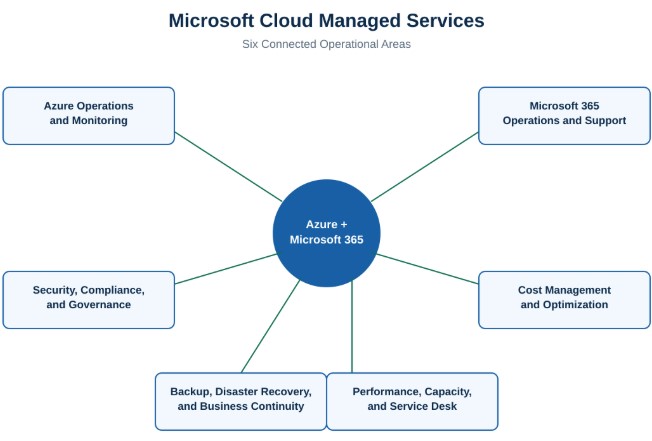
The six connected operational areas of Microsoft Cloud Managed Services
Azure Operations and Monitoring
Azure environments require ongoing visibility into infrastructure health, application performance, network activity, utilization, availability, and emerging operational issues.
Managed Azure operations can include infrastructure monitoring, alert management, log analysis, incident detection, service health reviews, performance assessment, patch coordination, and escalation support. The purpose is to build a consistent operating rhythm around the Azure environment rather than depending solely on manual checks or reacting after users report a problem.
For organizations planning or expanding their cloud environment, Microsoft’s Cloud Adoption Framework provides guidance across strategy, planning, readiness, adoption, governance, security, and management. Microsoft identifies management as a continuing operational discipline for administering and optimizing cloud workloads.
Microsoft 365 Operations and Support
Microsoft 365 may support email, collaboration, document management, communication, identity, and everyday productivity across an organization. As adoption expands, managing the environment often involves more than assigning licenses.
Microsoft 365 Managed Services can cover tenant administration, Exchange Online, Microsoft Teams, SharePoint Online, OneDrive, Microsoft Entra ID, user onboarding and offboarding, license management, conditional access, retention settings, governance, health monitoring, and user support.
This creates one operating framework for both Azure and Microsoft 365. It can also reduce fragmentation between infrastructure administration, user productivity support, identity management, and security controls — and it connects naturally to Microsoft 365 licensing optimization once the operating model is in place.
Security, Compliance, and Governance
Cloud security is a continuous operational responsibility. Identity permissions, access policies, workload configurations, devices, data controls, subscriptions, and regulatory requirements need ongoing attention as the environment changes.
Managed security and governance services can help organizations establish and maintain identity and access controls, policy enforcement, security monitoring, compliance reporting, governance standards, configuration reviews, and audit readiness. These responsibilities may be aligned with the organization’s applicable security and compliance requirements.
Microsoft’s Cloud Adoption Framework separates govern and secure into dedicated operational methodologies. The govern methodology addresses cloud risks and controls, while the secure methodology focuses on protecting workloads through appropriate security controls — the same principles behind Cloud 9’s managed cloud security and uptime practices.
Cost Management and Cloud Optimization
Moving to the cloud changes how technology spending is managed. Instead of purchasing only fixed infrastructure, organizations may need to monitor consumption, resource utilization, subscription structures, reserved capacity options, license allocation, and changing workload demand.
Managed cloud cost optimization can provide clearer visibility into Azure and Microsoft 365 spending. This may include identifying idle resources, reviewing workload sizing, assessing Microsoft 365 license usage, configuring budget alerts, analyzing consumption patterns, and evaluating Azure Savings Plans or Reserved Instances where appropriate.
The objective is not simply to reduce spending. It is to connect cloud consumption to business requirements and ensure that the environment is appropriately sized, visible, and governed — an approach covered in more depth in Cloud 9’s Azure cost optimization strategies.
Backup, Disaster Recovery, and Business Continuity
Cloud adoption does not remove the need for business continuity planning. Organizations still need to define which workloads and data are critical, how they will be protected, and how services will be recovered following a disruption.
Managed backup and disaster recovery services can include backup policy administration, data retention, recovery planning, disaster recovery architecture, recovery testing, failover coordination, and alignment with recovery time and recovery point objectives.
A managed services provider can help keep these responsibilities within the normal operating model instead of treating recovery planning as a one-time technical project. Businesses can review Cloud 9’s disaster recovery services to see how backup and failover planning fits into a broader managed operating model.
Performance, Capacity, and Service Desk Management
An Azure or Microsoft 365 environment needs to adapt as user demand, workloads, data volumes, and business requirements change.
Performance and capacity management can include resource utilization reviews, workload tuning, scaling recommendations, service health analysis, technical support, change management, release coordination, and issue escalation.
A clearly defined service desk structure also gives employees and internal technology teams an established path for support. Rather than depending on informal troubleshooting, issues can be categorized, prioritized, assigned, tracked, escalated, and reviewed against agreed service requirements.
What Is the Difference Between Cloud Hosting and Managed Cloud Services?
Cloud hosting gives an organization access to cloud infrastructure and services. Managed cloud services add the operational expertise and processes required to administer that environment over time.
A business can purchase and deploy Azure resources without engaging a managed services provider. However, the business remains responsible for monitoring, administration, access control, workload configuration, optimization, backup, governance, and support unless those responsibilities are assigned elsewhere.
Microsoft Cloud Managed Services provide the people, processes, and operating framework surrounding the technology. The provider helps manage how the cloud environment is monitored, secured, supported, governed, optimized, and improved.
Cloud Hosting | Managed Cloud Services |
Provides access to Azure infrastructure and services | Adds the operational expertise and processes to administer that environment |
Customer remains responsible for monitoring, access control, and support | Provider takes on defined monitoring, administration, and support responsibilities |
The technology platform | The people, processes, and operating framework around the platform |
In simple terms, cloud hosting provides the technology platform. Managed services help an organization operate that platform consistently.
How Microsoft Cloud Managed Services Support an Internal IT Team
Many organizations already have skilled internal IT professionals. The challenge is often capacity rather than competence.
Internal teams may be responsible for business applications, infrastructure, end-user support, security, compliance, projects, vendors, and strategic initiatives at the same time. Routine operational activities can consume resources that could otherwise be applied to higher-value business work.
A Microsoft Managed Services Provider can extend the internal team by assuming clearly defined responsibilities. For example, the provider may handle infrastructure monitoring, after-hours alerts, patch coordination, tenant administration, backup reviews, cost reports, or Tier 1 through Tier 3 support, while the customer retains ownership of business priorities and strategic decisions.
The most effective model establishes clear roles from the beginning. The Microsoft Managed Services Provider should understand the existing architecture, business objectives, security requirements, compliance needs, internal capabilities, and escalation expectations before taking operational responsibility.
What Should Business Leaders Look for in a Microsoft Managed Services Provider?
Selecting a provider should involve more than comparing a list of technologies. Business leaders should assess whether the provider has a structured approach to service delivery, governance, escalation, security, reporting, cost management, and continuous optimization.
The provider should be able to explain precisely which responsibilities are included, which remain with the customer, how incidents are prioritized, how performance is reported, how service changes are managed, and how the engagement will adapt as the environment evolves.
Leaders should also evaluate the provider’s verified Microsoft expertise, operational experience, security and governance capabilities, Microsoft 365 knowledge, Azure specialization, service-level structure, onboarding process, and ability to work alongside the existing IT team.
Cloud 9 Infosystems is a Microsoft Azure Expert Managed Services Provider. Cloud 9’s Microsoft Cloud Managed Services model combines Azure and Microsoft 365 operations across monitoring, security, governance, backup, disaster recovery, cost optimization, performance management, and technical support.
Why a Microsoft Azure Expert MSP Matters
An Azure Expert Managed Services Provider has demonstrated specialized capabilities for managing Azure environments. For customers, this can provide additional assurance that the provider’s operating model, technical capability, and Azure expertise have been evaluated through Microsoft’s program requirements.
However, a designation should not be the only consideration. The provider must still understand the customer’s business objectives, architecture, internal team, security responsibilities, support requirements, and desired.
The strongest engagement combines validated Microsoft expertise with a business-focused operating model — technology decisions should connect to the organization’s needs, not follow a standard package.
Cloud 9 structures its Azure and Microsoft 365 Managed Services around a discovery-led approach that considers business objectives, compliance requirements, current architecture, and existing technical resources before operations begin.
When Should a Business Consider Microsoft Cloud Managed Services?
A business may benefit from managed services when the Microsoft cloud environment has grown beyond the internal team’s available capacity, when operational responsibilities are unclear, or when monitoring and support are primarily reactive.
Managed services can also be relevant when an organization is preparing for or completing an Azure migration. Migration moves workloads to the cloud, but an ongoing operating model is required afterward to govern, secure, support, and optimize those workloads. Organizations at this stage can review Cloud 9’s Azure Migrate services and connect migration planning with long-term management.
Additional signs may include inconsistent cloud cost visibility, recurring incidents, limited after-hours support, growing security requirements, audit preparation challenges, Microsoft 365 administration demands, or insufficient time for internal teams to focus on modernization.
The right time to explore managed services is before operational pressure becomes a serious business constraint.
How to Prepare for a Managed Services Engagement
A productive engagement starts with clarity. Before selecting a provider, business and technology leaders should work through the following areas:
- Understand the current cloud estate — the Azure and Microsoft 365 services, workloads, and configurations already in place.
- Identify critical workloads — the systems and data that matter most to business continuity and performance.
- Document regulatory obligations — the compliance and industry requirements the environment must meet.
- Define support expectations — response times, escalation paths, and service-level needs.
- Map operational pain points — where monitoring, security, or cost visibility is currently falling short.
- Assess internal skills and cloud spending — what the internal team already covers well, and where budget is going today.
- Clarify desired business outcomes — what success looks like once the engagement is underway.
Microsoft’s Cloud Adoption Framework recommends aligning cloud adoption with business outcomes and preparing people, processes, and technology as part of the cloud journey. Its strategy, plan, ready, adopt, govern, secure, and manage methodologies provide a useful structure for evaluating both cloud adoption and ongoing operations.
This does not mean every responsibility must be transferred to the provider. A customized operating model can define what the provider manages, what the internal team owns, how both teams collaborate, and how accountability is measured.
Turning Microsoft Cloud Operations into a Business Advantage
Microsoft Cloud Managed Services can give organizations a more structured way to operate Azure and Microsoft 365. The value comes from bringing monitoring, security, governance, support, cost management, business continuity, and optimization into one coordinated operating model.
For business leaders, the key question is not only whether the company has adopted Microsoft cloud technology. The more important question is whether the environment is being managed in a way that supports the organization’s long-term goals.
Cloud 9 Infosystems helps organizations manage Azure and Microsoft 365 through services designed around security, reliability, cost visibility, operational accountability, and business requirements.
Ready to Evaluate the Right Operating Model for Your Microsoft Cloud Environment?
Frequently Asked Questions
What are Microsoft Cloud Managed Services?
Microsoft Cloud Managed Services provide ongoing management, monitoring, support, security, governance, cost optimization, backup, and administration for Microsoft Azure and Microsoft 365 environments. The services are delivered by a provider that assumes agreed operational responsibilities while working with the customer’s internal team.
What services are included in Microsoft Managed Services?
The scope can include Azure infrastructure monitoring, Microsoft 365 tenant administration, identity and access management, security and compliance support, cloud cost optimization, backups, disaster recovery, service desk support, capacity planning, patch coordination, and performance management.
What is a Microsoft Managed Services Provider?
A Microsoft Managed Services Provider is an organization that manages selected or complete operational responsibilities across a customer’s Microsoft cloud environment. The provider may support Azure, Microsoft 365, Microsoft Entra ID, security, governance, backups, cost management, and end users, depending on the agreed service scope.
What is the difference between Azure Managed Services and Microsoft Cloud Managed Services?
Azure Managed Services primarily focus on Microsoft Azure workloads and infrastructure. Microsoft Cloud Managed Services can have a broader scope that includes Azure, Microsoft 365, identity, productivity, security, governance, and support within one operating model.
Do Microsoft Cloud Managed Services replace an internal IT team?
Not necessarily. Managed services can complement the internal IT team by taking responsibility for defined monitoring, administration, support, optimization, and governance activities. This allows internal employees to focus more attention on business priorities and strategic technology initiatives.
How do Microsoft Cloud Managed Services support security?
Managed services can support identity and access management, policy enforcement, monitoring, configuration reviews, security alerts, compliance reporting, governance, and coordination of incident response. The exact security responsibilities should be documented clearly between the provider and the customer.
Can a managed services provider help control Azure costs?
A provider can support Azure cost visibility, resource utilization reviews, workload rightsizing, budget alerts, consumption analysis, identification of idle resources, and evaluation of relevant purchasing options. Cost decisions should be aligned with workload performance and business requirements.
What should a company look for in a Microsoft Managed Services Provider?
A company should assess Microsoft expertise, Azure and Microsoft 365 capabilities, security practices, governance processes, service reporting, escalation procedures, onboarding methods, service-level definitions, cost optimization capabilities, and the provider’s ability to work with the existing IT team.
Why choose an Azure Expert Managed Services Provider?
An Azure Expert Managed Services Provider has demonstrated specialized Azure managed services capabilities through Microsoft’s program requirements. Organizations should combine this qualification with an evaluation of the provider’s operating model, service scope, customer alignment, security approach, and support capabilities.
How can a business get started with Microsoft Cloud Managed Services?
The business can begin by assessing its Azure and Microsoft 365 environment, operational responsibilities, support needs, security requirements, compliance obligations, internal skills, and current cloud costs. These inputs help define an appropriate managed services scope and responsibility model.
Is Cloud 9 Infosystems a Microsoft Azure Expert Managed Services Provider?
Yes. Cloud 9 Infosystems holds the Microsoft Azure Expert MSP designation, reflecting demonstrated Azure managed services capabilities evaluated through Microsoft’s program requirements.
Can Cloud 9 manage both Azure and Microsoft 365 under one engagement?
Yes. Cloud 9’s model brings Azure operations and Microsoft 365 operations together into one operating framework, which helps reduce fragmentation between infrastructure administration, productivity support, identity management, and security controls.
What does Cloud 9's onboarding process for Managed Services look like?
Cloud 9 structures its Azure and Microsoft 365 Managed Services around a discovery-led approach — reviewing business objectives, compliance requirements, current architecture, and existing technical resources before operations begin.
Does Cloud 9 provide Microsoft Cloud Managed Services to businesses outside Chicago and Illinois?
Cloud 9 Infosystems is headquartered in Downers Grove, Illinois, serving the greater Chicago area, and supports organizations across Illinois and the broader United States.
Recent Posts

FabCon Europe 2026: What Fabric IQ and Data Agents Mean for Your Business
Fabric IQ in Microsoft Copilot is now generally available and on by default. Learn what it means for Power BI, its current limits, and a 6-step plan to get your semantic models ready.

Azure Virtual Desktop Regional Host Pools Are Now GA. Here Is Why Your Next Host Pool Should Be Regional.
Azure Virtual Desktop regional host pools are now generally available. Learn how they improve resiliency, reduce shared regional dependencies, support data sovereignty, and help IT teams build stronger AVD disaster recovery designs.

Generative AI Data Security: How to Prepare Microsoft 365 Before You Roll Out Copilot
Generative AI data security starts with securing the data Microsoft 365 Copilot can access. Learn how to fix oversharing, protect sensitive content, control AI use and prepare your Microsoft 365 environment for a safer Copilot rollout.

Join Us on the Journey to Transforming Futures - Contact Us!
Schedule a meeting with our experts or fill out the form for a free assessment of your environment today!


*Cloud 9 reserves the right for free assessment eligibility.