

AI-Assisted Azure Migration: What the Azure Copilot Migration Agent Actually Changes
According to Microsoft’s own product documentation, one of the core reasons migration projects go sideways is straightforward: dependencies get missed. Azure Migrates dependency analysis exists specifically to make sure nothing is left behind, because an overlooked dependency does not show up as a line item on a project plan, it shows up as a surprise outage after cutover. That single, well-documented failure mode is exactly what an AI-assisted cloud migration assessment is built to catch earlier, and cheaper, than a manual pass ever could.
Ask anyone who has run a large migration project what they remember most, and it is rarely the destination. It is the months of manual discovery spreadsheets, the dependency mapping nobody was fully confident in, and the legacy database code that needed a specialist to even read, let alone convert. That is the part of migration Microsoft has been quietly rebuilding, not with a new destination, but with AI embedded directly into the discovery, planning, and code conversion work itself.
Here is what has actually changed in Microsoft’s own migration tooling, and what it means for how much risk a migration project actually carries today.
WHAT YOU WILL LEARN
- What the Azure Copilot migration agent actually does, and where it fits in a migration project
- How AI-assisted code conversion is changing legacy database migrations specifically
- Why this changes the real risk profile of a migration, not just the speed
- Where AI-assisted migration is genuinely ready today, and where a human still leads
THE SHORT VERSION
- Microsoft has introduced the Azure Copilot migration agent, now in public preview, which embeds AI across discovery, assessment, planning, and deployment for migration and modernization projects.
- According to Microsoft, the agent turns migration from a one-time project into what Microsoft calls a continuous modernization motion, with AI-guided workload prioritization, cost visibility, and automated wave recommendations.
- Separately, Microsoft has introduced an AI-powered Copilot inside the SQL Server Migration Assistant that reads, explains, and rewrites legacy database code using large language models.
- These tools do not remove the need for a migration plan. They remove a large share of the manual, error-prone work that used to make migration plans slow and risky to build.
Why Migration Has Historically Been the Risky Part
Cloud platforms have matured enormously. The part of the journey that has stayed stubbornly hard is not the destination; it is getting there.
Discovery and assessment used to be the slowest, most manual phase. Understanding what you actually run, how it connects together, and what it will cost to move has traditionally required extensive manual documentation and spreadsheet work, often the single biggest source of delay in a migration timeline.
Legacy code conversion required specialized, scarce expertise. Converting database procedures written years ago in a platform-specific language into something a modern target platform understands is exactly the kind of detailed, error-prone work that stalls projects waiting on the one person who understands both the old system and the new one.
The technology you are migrating to has never been the hard part. Understanding what you actually have, and translating it accurately, has been.
This is exactly where Microsoft has focused its recent AI investment in migration tooling, and it is worth understanding what has actually changed versus what is still marketing language.
The Azure Copilot Migration Agent: What It Actually Does
Microsoft announced the Azure Copilot migration agent as what it calls the first agentic end-to-end modernization solution, now in public preview.
It works across the whole migration lifecycle, not just one step. According to Microsoft’s own announcement, the agent embeds AI across discovery, assessment, planning, and deployment, working for servers, virtual machines, applications, and databases. Microsoft describes AI agents operating in parallel across these stages, automating dependency mapping and generating decision-ready plans.
It is designed to be conversational, not just automated. Per Microsoft’s documentation, the Azure Copilot migration agent lets you use natural language prompts to explore your discovered inventory, ask about readiness, compare migration strategies, and understand cost estimates. You can ask it to interpret assessment results, summarize readiness signals, identify blockers, and explain the reasoning behind a sizing recommendation, rather than reading raw output and drawing your own conclusions.
It generates business cases, not just technical assessments. Microsoft states the agent produces business case generation with ROI insights tailored to your specific environment and can generate landing zone configurations based on your target regions, compliance needs, and connectivity preferences, ready for deployment workflows.
Microsoft’s own framing is a meaningful shift in mindset. Rather than positioning migration as a one-time project, Microsoft describes the goal as turning it into a continuous modernization motion, where the same AI-guided visibility into inventory, cost, and readiness persists after the initial move, not just during it.
Curious what an AI-assisted assessment would actually show for your environment?
In a free 30-minute consultation, Cloud 9 Infosystems will walk through what a modern cloud migration assessment looks like for your specific workloads, using the same AI-assisted tooling covered here, and where the real time and risk savings are.
AI-Assisted Code Conversion: Where the Real Grunt Work Lived
Migration planning is one problem. Actually, converting legacy database code is a separate, often harder one, and this is where Microsoft has made some of its most concrete progress.
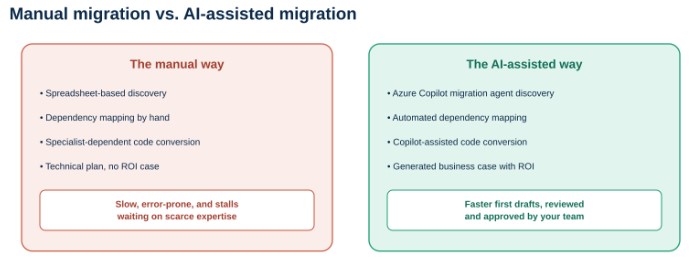
What changes when AI is embedded across the migration workflow, not layered on top of it.
Microsoft has built an AI Copilot directly into the SQL Server Migration Assistant. According to Microsoft’s own announcement, this Copilot uses large language models to understand, explain, and rewrite complex legacy database code into SQL Server-compatible syntax, augmenting the tool’s existing rule-based conversion engine with context-aware transformation.
It is built to explain its reasoning, not just output a result. Microsoft describes the experience as collaborative rather than purely automated: the Copilot acts like a knowledgeable peer, helping a developer reason through a tricky conversion and explaining its logic, rather than presenting a black-box rewrite with no context for why a particular translation was chosen.
This directly targets one of migration’s classic bottlenecks. Complex legacy procedural code has historically required a specialist fluent in both the source and target platforms. AI-assisted conversion does not eliminate the need for review, but it removes a significant share of the first-draft translation work that used to consume the most specialized, hardest-to-schedule hours on a project.
Microsoft Copilot is also built directly into Azure Arc-enabled SQL Server migrations. For organizations using SQL Server enabled by Azure Arc, Microsoft has embedded Copilot into the migration dashboard itself, supporting natural-language prompts like comparing migration options, starting a migration, and monitoring progress, all without leaving the tool.
What This Changes, and What It Does Not
It is worth being precise about what AI-assisted migration actually removes from a project, versus what still needs a human making the call.
What it removes: the slow, manual first pass at discovery, dependency mapping, and code translation, along with the specialized bottleneck of finding someone fluent enough in a legacy language to hand-convert every procedure.
What it does not remove: the judgment calls about business priority, the decisions about which workloads to modernize versus simply rehost, and the review step that confirms an AI-suggested conversion or a Copilot-generated business case actually reflects your environment correctly.
This is the same principle we cover in our Enterprise AI Strategy 4-Layer System: AI accelerates the work dramatically, but it is grounded in your real context and reviewed by people who understand what is actually at stake, not left to run unsupervised on judgment calls.
How to Actually Use This on Your Next Migration
You do not need to migrate an entire estate with a single tool to benefit from this shift. A practical way to bring AI-assisted migration into a real project looks like this:
- Start discovery with the Azure Copilot migration agent, not a spreadsheet. Let it build the initial inventory, dependency map, and readiness assessment, then review and correct it, rather than starting from a blank document.
- Use AI code conversion as a strong first draft, not a final answer. For legacy database migrations, let Copilot in the migration tooling handle the initial conversion, then have a qualified reviewer validate the output before it goes to production.
- Ask for the business case, not just the technical plan. Use the agent’s ROI and cost-visibility capabilities to build the case leadership actually needs to approve the project, rather than presenting a purely technical migration plan.
- Keep a human decision-maker on every “what should we do” question. Let AI handle the “what do we have and what would it cost” questions at scale, and reserve strategic prioritization decisions for the people accountable for the outcome.
Cloud 9 Infosystems has spent 16-plus years running exactly this kind of migration and modernization work for US enterprises across healthcare, financial services, and enterprise IT. Our Azure Migrate solutions practice already incorporates this AI-assisted tooling into how we scope every cloud migration assessment, and as a Microsoft Azure Expert MSP, we can also help qualifying engagements access funding through Microsoft’s Azure Migration and Modernization Program (AMMP), which supports eligible infrastructure, database, and legacy application modernization projects.
The Bottom Line for IT Leaders
The riskiest part of any migration has never really been Azure itself. It has been the discovery, the dependency mapping, and the legacy code conversion that happened before a single workload actually moved. Microsoft’s AI-assisted migration tooling is aimed squarely at that riskiest phase, not at replacing the judgment a migration still requires.
The organizations that benefit most will not be the ones who let an agent run unsupervised. They will be the ones who use it to compress the slow, manual, error-prone parts of the work, and spend the time they save on the decisions that actually needed a person all along.
Microsoft Resources Referenced in This Article
- Many agents, one team: Scaling modernization on Azure (Microsoft Azure Blog)
- Azure Copilot migration agent (preview) overview (Microsoft Learn)
- Migration agent capabilities in Azure Copilot (Microsoft Learn)
- AI-assisted code conversion Copilot for Oracle-to-SQL migrations (Microsoft Community Hub)
- SQL Server migration in Azure Arc: migration overview (Microsoft Learn)
- Dependency analysis in Azure Migrate (Microsoft Learn)
- Azure Migration and Modernization Program (AMMP) (Microsoft Azure Blog)
Frequently Asked Questions
What is the Azure Copilot migration agent?
The Azure Copilot migration agent is a conversational, AI-powered capability in public preview that helps plan and execute cloud migrations using natural language. According to Microsoft, it embeds AI across discovery, assessment, planning, and deployment, and can generate business cases, cost estimates, and landing zone configurations based on your actual environment.
Does AI-assisted migration replace the need for a migration plan?
No. Microsoft’s own tooling is designed to accelerate discovery, assessment, and code conversion, but strategic decisions about priority, sequencing, and which workloads to modernize versus simply move still require human judgment. AI compresses the manual, error-prone first pass work rather than replacing the decision-making around it.
How does AI help with legacy database code conversion?
Microsoft has built an AI Copilot into the SQL Server Migration Assistant that uses large language models to understand, explain, and rewrite complex legacy database code into SQL Server-compatible syntax. Microsoft describes it as working like a knowledgeable peer, explaining its reasoning rather than simply outputting a converted result, which still benefits from a qualified reviewer validating the output.
Is the Azure Copilot migration agent generally available?
As of Microsoft’s announcement, the Azure Copilot migration agent is in public preview, meaning it is available to use but may still be evolving with new capabilities before reaching general availability.
What kinds of workloads can Azure's AI-assisted migration tools handle?
According to Microsoft, the tooling covers servers, virtual machines, web applications, and databases, including specific support for SQL Server migrations to Azure SQL Managed Instance, Azure SQL Database, or SQL Server on Azure Virtual Machines, as well as PostgreSQL and MySQL databases.
Is the Azure Copilot migration agent free?
Azure Migrate, the underlying platform the agent runs on, is a free service in the Azure portal. Using the Copilot migration agent itself requires Azure Copilot to be enabled for your tenant. Separate migration execution costs can still apply, such as Azure Site Recovery for replication or premium tiers of Azure Database Migration Service for certain database scenarios, so the assessment and planning work is free, while some downstream migration steps carry their own cost.
What databases are supported by Azure's AI-assisted migration tools?
According to Microsoft, the Azure Copilot migration agent provides integrated assessment and migration for PostgreSQL and MySQL databases. Separately, SQL Server databases are supported through Azure Migrate and through Copilot built into SQL Server Arc-enabled migration. Coverage is expanding, so it is worth checking current Microsoft documentation for your specific database platform.
How accurate is AI-assisted code conversion for legacy database migrations?
Microsoft has not published a specific accuracy percentage for the Copilot-assisted code conversion in the SQL Server Migration Assistant. Microsoft instead frames it as augmenting the tool’s existing rule-based engine and explaining its reasoning during conversion, which is why Microsoft’s own materials describe the experience as collaborative, with a qualified reviewer expected to validate converted code before it goes to production.
Can Azure Copilot migrate VMware workloads?
The Azure Copilot migration agent currently supports VMware workload migrations, along with Hyper-V and physical server migration planning, according to Microsoft’s own documentation. It is important to note the agent handles discovery, assessment, and planning for these scenarios. The actual replication, test migration, and cutover steps still happen through Azure Migrate directly, not through the agent itself.
Should we still use a migration partner if Microsoft's tools use AI?
Yes. AI-assisted tooling accelerates discovery and first-draft code conversion, but validating outputs, making sequencing decisions, and aligning a migration with your specific compliance and business requirements still benefits from experienced human oversight, particularly for regulated industries or complex legacy environments.
Ready to See What AI-Assisted Migration Actually Looks Like for Your Environment?
The riskiest, slowest part of migration used to be the manual discovery and code conversion work. Cloud 9 Infosystems will show you what an AI-assisted assessment reveals about your environment and build a migration plan around what actually matters.
Recent Posts

AI-Assisted Azure Migration: What the Azure Copilot Migration Agent Actually Changes
Microsoft’s AI-assisted Azure migration tools are changing how enterprises discover workloads, map dependencies, plan migration waves, and convert legacy database code—reducing manual effort while keeping critical decisions and validation with human experts.

What Is Generative AI and How Is It Changing Workplace Productivity?
Discover how Generative AI can improve workplace productivity by accelerating content creation, reducing information overload, supporting analysis, and improving communication while balancing human judgment, trusted data, security, governance, and measurable outcomes.

Top Generative AI Use Cases Transforming Industries
Discover the top generative AI use cases transforming healthcare, finance, manufacturing, retail, HR, customer service, IT, and enterprise knowledge management while improving productivity, innovation, customer experiences, and business efficiency.

Join Us on the Journey to Transforming Futures - Contact Us!
Schedule a meeting with our experts or fill out the form for a free assessment of your environment today!


*Cloud 9 reserves the right for free assessment eligibility.