

Azure Virtual Desktop Hybrid Is Now Generally Available. Here Is What Changes.
For years, Azure Virtual Desktop meant one thing: your session hosts ran in Azure, full stop. If data residency rules, specialized hardware, or latency-sensitive applications kept your desktops on-premises, AVD simply wasn’t an option — you either lived without its management experience or built a VPN-tethered workaround.
That trade-off is gone. Microsoft has announced that Azure Virtual Desktop Hybrid is now generally available, letting organizations run session hosts on their own on-premises servers or other clouds while keeping the entire control plane — brokering, gateway, diagnostics, management — in Azure. No VPN. No inbound firewall rules. No compromise between “cloud-managed” and “on-prem-hosted.”
WHAT YOU WILL LEARN
✓ What Azure Virtual Desktop Hybrid actually is and how the architecture works
✓ Why the outbound-only connectivity model is the real news here, not just “AVD on-prem”
✓ Who this is genuinely built for — and who should still migrate fully to the cloud
✓ A practical way to evaluate whether AVD Hybrid fits your environment
✓ Straight answers to the questions IT leaders are asking about it
THE SHORT VERSION
✓ Azure Virtual Desktop Hybrid is now generally available (GA)
✓ Session hosts run on your own on-premises hardware, hypervisor, or another cloud — not in Azure
✓ Azure Arc connects those hosts to the Azure control plane for brokering, management, and monitoring
✓ All communication is outbound-only over HTTPS — no VPN or inbound firewall rules required
✓ Users connect the same way as always, through the Windows App
✓ It’s built for organizations with a real reason to keep compute on premises, not as a replacement for cloud migration
The Choice This Removes
Until now, IT leaders evaluating AVD faced a binary decision. Move desktop workloads to Azure and get centralized management, simplified patching, and elastic scale — but give up control over where the compute physically runs. Or keep session hosts on-premises for data residency, regulatory, hardware, or latency reasons — but manage them the old way, without AVD’s brokering and control-plane benefits, often stitching together a site-to-site VPN to make any hybrid connectivity work at all.
Azure Virtual Desktop Hybrid removes that either/or. Organizations can now keep session hosts exactly where compliance, hardware investment, or performance requirements demand, while still running them through Azure’s management, monitoring, and connection-brokering layer.
This matters most for a specific set of situations: healthcare and financial services organizations with data residency mandates that prevent desktop workloads from leaving a specific facility or region; manufacturers and engineering firms with specialized on-premises hardware (GPUs, industrial control systems, legacy peripherals) that desktop sessions need low-latency access to; and organizations with recent, substantial on-premises hardware investments who aren’t ready to strand that capital by moving everything to the cloud.
How It Actually Works
The architecture separates two things that used to be bundled together: where the session host runs, and where it’s managed from.
Session hosts stay on infrastructure you control — your own hypervisor, bare-metal servers in your datacentre, or virtual machines in another cloud. Each of these hosts is registered with Azure Arc, which acts as the connective layer between your on-premises environment and Azure. Once Arc-enabled, the AVD Hybrid extension is deployed to the host, registering it with your Azure Virtual Desktop host pool exactly as a cloud-hosted session host would be.
From there, the control plane behaves identically to standard AVD. Brokering, load balancing, diagnostics, and connection management all run from Azure. Users connect through the Windows App, the same client Microsoft now uses across its remote desktop and Windows 365 offerings, with no difference in the end-user experience between a cloud-hosted session and an on-premises one.
The practical result: your Windows desktops physically run on hardware you own, while your IT team manages them through the same Azure portal, policies, and tooling used for every other AVD deployment.
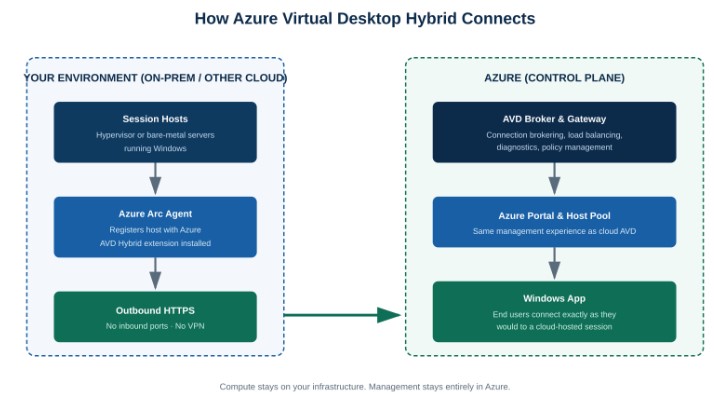
How Azure Virtual Desktop Hybrid connects on-premises session hosts to the Azure control plane through Azure Arc
Why the Connectivity Model Is the Real Story
Plenty of “hybrid AVD” attempts have existed before, usually built on a site-to-site VPN connecting an on-premises network to an Azure virtual network. They worked, but they came with real costs: VPN infrastructure to build and maintain, inbound connectivity paths to secure and monitor, and a meaningfully larger attack surface for security teams to defend.
Azure Virtual Desktop Hybrid’s connectivity model is the actual breakthrough. According to Microsoft’s general availability announcement, all communication between the on-premises session hosts and the Azure control plane happens over outbound-only HTTPS connections. There is no requirement for inbound connectivity, no VPN tunnel to provision, and no firewall ports to open inward.
“Azure Virtual Desktop Hybrid is now generally available, allowing you to run Windows session hosts on-premises or in other clouds while managing them through Azure — using secure, outbound-only connectivity with no VPN required.” — Microsoft Azure Virtual Desktop Team, general availability announcement
For security and networking teams, this is the detail worth pausing on. Outbound-only HTTPS is a connectivity pattern already well understood and defensible — it’s the same posture as any SaaS application reaching out to its cloud backend. There’s no new inbound attack surface to add to a firewall review, no VPN concentrator to patch and monitor, and no site-to-site tunnel that becomes a single point of failure.
Not sure whether your current AVD or on-premises VDI setup could benefit from this model?
Cloud 9 Infosystems helps organizations evaluate Azure Virtual Desktop architecture decisions — hybrid, full cloud, or a phased path between them.
Who This Is Actually Built For
AVD Hybrid is a targeted solution, not a general recommendation. It’s built for organizations that have a real, specific reason to keep session hosts on-premises:
- Data residency and regulatory requirements that mandate desktop compute stay within a specific facility, region, or jurisdiction
- Recent on-premises hardware investment — organizations that bought server infrastructure or specialized hardware they aren’t ready to retire
- Latency-sensitive or hardware-dependent applications that need session hosts physically close to specialized equipment, industrial systems, or high-performance local resources
- Organizations that value AVD’s management experience — brokering, monitoring, policy management — but can’t yet or don’t want to relocate the underlying compute
It is not built for organizations that are simply hesitant about cloud migration without a concrete driver. If there’s no data residency requirement, no hardware dependency, and no recent capital investment anchoring workloads on-premises, a full cloud AVD deployment still offers simpler operations, elastic scaling, and one less infrastructure layer to maintain and patch.
How to Evaluate Whether This Fits Your Environment
- Identify the actual constraint. Name the specific reason session hosts can’t move to Azure today — a regulation, a hardware dependency, a contractual term, or a capital investment timeline. If you can’t name one, cloud-hosted AVD is likely the simpler path.
- Inventory what’s Arc-ready. Azure Arc supports a range of on-premises hypervisors and bare-metal configurations, but your existing infrastructure needs to be assessed against current Arc requirements before committing to a hybrid design.
- Map your network egress posture. Because AVD Hybrid relies on outbound-only HTTPS, confirm your existing firewall and proxy configuration can support the required outbound connectivity to Azure without additional inbound exceptions.
- Plan for the exit, not just the entry. Hybrid deployments work best as a deliberate stage, not a permanent parking spot. Define what would need to change — hardware refresh, regulatory shift, contract expiration — before session hosts could move fully to Azure, so the hybrid phase has a defined endpoint rather than becoming indefinite.
The Bottom Line for IT Leaders
Azure Virtual Desktop Hybrid closes a real gap. Organizations that had a legitimate reason to keep desktop compute on-premises previously had to choose between AVD’s management model and their operational constraints. Now they don’t have to choose — and they get there without the VPN infrastructure and inbound attack surface that older hybrid VDI approaches required.
The organizations that benefit most are the ones with a genuine constraint keeping them on-premises today. If that describes your environment, AVD Hybrid is worth evaluating seriously. If it doesn’t, a straightforward cloud-hosted AVD deployment remains the simpler, lower-maintenance path.
Microsoft Resources Referenced
Frequently Asked Questions
What is Azure Virtual Desktop Hybrid?
It’s a deployment model for Azure Virtual Desktop that lets you run session hosts on your own on-premises infrastructure or another cloud, while Azure continues to provide the control plane — brokering, management, diagnostics, and policy — through Azure Arc.
Does Azure Virtual Desktop Hybrid require a VPN?
No. Connectivity between on-premises session hosts and the Azure control plane uses outbound-only HTTPS. There’s no VPN tunnel or inbound firewall rule required.
What hardware or hypervisor is supported?
Session hosts run on infrastructure enabled through Azure Arc, which supports a range of on-premises hypervisors and bare-metal server configurations. Specific supported configurations should be checked against current Microsoft Learn documentation before planning a deployment.
How is this different from a standard, fully cloud-hosted AVD deployment?
The end-user experience and management plane are identical. The difference is entirely in where the session host compute physically runs — your own infrastructure instead of Azure-hosted virtual machines.
Who should consider Azure Virtual Desktop Hybrid?
Organizations with a specific, documented reason to keep desktop compute on-premises — data residency requirements, specialized hardware dependencies, or recent infrastructure investment — while still wanting Azure’s management and brokering capabilities.
How do users connect to an AVD Hybrid session?
Through the Windows App, the same client used for standard cloud-hosted Azure Virtual Desktop sessions. There is no difference in the connection experience for end users.
Ready to figure out whether Azure Virtual Desktop Hybrid — or a fully cloud-hosted deployment — is the right fit for your environment?
Cloud 9 Infosystems is a Microsoft Azure Expert MSP based in Downers Grove, Illinois, helping organizations design and manage Azure Virtual Desktop environments that match their real constraints.
Recent Posts

Azure Virtual Desktop Regional Host Pools Are Now GA. Here Is Why Your Next Host Pool Should Be Regional.
Azure Virtual Desktop regional host pools are now generally available. Learn how they improve resiliency, reduce shared regional dependencies, support data sovereignty, and help IT teams build stronger AVD disaster recovery designs.

Generative AI Data Security: How to Prepare Microsoft 365 Before You Roll Out Copilot
Generative AI data security starts with securing the data Microsoft 365 Copilot can access. Learn how to fix oversharing, protect sensitive content, control AI use and prepare your Microsoft 365 environment for a safer Copilot rollout.

FabCon Europe 2026: What Fabric IQ and Data Agents Mean for Your Business
Microsoft 365 Copilot has reached 30 million paid seats, but licenses alone do not guarantee value. Learn how to measure adoption, track ROI, optimize usage, and right-size Copilot licensing before your next renewal.

Join Us on the Journey to Transforming Futures - Contact Us!
Schedule a meeting with our experts or fill out the form for a free assessment of your environment today!


*Cloud 9 reserves the right for free assessment eligibility.