

FabCon Europe 2026: What Fabric IQ and Data Agents Mean for Your Business
Your Power BI semantic model just became the source of truth Microsoft Copilot uses to answer business questions. It is generally available and switched on by default. Here is what that means, what it does not do yet and how to get your data ready.
Fabric IQ in Microsoft Copilot Chat and Copilot Cowork
For Fabric and Power BI customers
For Copilot customers, according to Microsoft
Power BI semantic models in use every day

Every Power BI team has heard the same request from leadership: “Can I just ask the data a question?”
At FabCon and SQLCon Europe 2026 in Barcelona, Microsoft answered it. Fabric IQ in Microsoft Copilot Chat and Copilot Cowork is now generally available, which means business users can ask Copilot a question and get an answer grounded in your governed Power BI reports and semantic models, right inside the tools they already use every day.
Microsoft says Copilot customers can now tap into these insights “without additional AI token costs.” And because it is on by default for Fabric and Power BI customers, the real question for IT leaders is no longer whether to adopt it. It is whether your data is ready for the questions people are about to ask.
What Fabric IQ Actually Is
Microsoft describes Fabric IQ as the layer that “elevates that data up to the language of your business,” so that “people and agents can correctly interpret the data and reason and make decisions in terms of business concepts and objectives.”
Raw tables tell AI
Where the numbers live: which table stores revenue, which column holds the region and how customer records join together.
Fabric IQ tells AI
What they mean: how your company defines revenue, which region rolls up where and what counts as an active customer.

The foundation for that meaning already exists in most organizations. According to Microsoft, more than 22 million Power BI semantic models are in use every day, making Power BI the world’s most widely adopted semantic layer. Fabric IQ turns that existing investment into the context layer for Copilot and AI agents.
What Is Now Generally Available?
Fabric IQ in Copilot Chat and Copilot Cowork
Ground a conversation in a Power BI report, ask questions and compare trends. According to Microsoft Learn, users can turn a number into an email, a document or a scheduled review “without leaving the conversation.” Copilot also infers which report or model is the right one to answer the question.
Fabric IQ MCP Server
Brings conversational analytics into the development environments your developers and analysts already use.
Fabric Data Agents
Fabric data agents answer questions over up to five data sources, including lakehouses, warehouses, KQL databases and Power BI semantic models. Microsoft Copilot Studio, Microsoft Foundry and Microsoft Teams can call them as part of wider agentic workflows.
Security: It Only Sees What Your Users Can See
This is the part that should reassure your security team. Microsoft Learn states that Cowork “queries Power BI as the signed-in user, item permissions and row-level security in Power BI continue to apply,” and that “Cowork doesn’t see data that you can’t already see in Power BI.” Sensitivity labels on reports and semantic models are honored too, and content created in the conversation inherits the conversation’s label.
“For Power BI customers, this extends the semantic foundation they already have into Microsoft Copilot while preserving existing access controls and governance.”
Jessica Hawk, CVP of Azure product marketing, Microsoft, in the official announcement
The catch is simple. If your permissions are messy today, Copilot will faithfully reflect that mess at conversational speed.
What It Does Not Do Yet
Generally available does not mean complete. Before you announce this to the business, know the current limits documented on Microsoft Learn.
No citations
Answers do not link back to the source report or semantic model, so users cannot click through to verify. Trust depends on model quality.
No DLP in Cowork
Data loss prevention is not currently supported in Cowork. Regulated teams should review this with compliance before wide rollout.
Reports only
Paginated reports, Power BI dashboards and Fabric items such as lakehouses, eventhouses, ontologies and data agents are not supported in the Cowork plugin.
Billing prerequisite
Users need Microsoft 365 Copilot Cowork access with usage-based billing. No additional Fabric capacity, F SKU or Premium Per User license is required for the plugin itself.
The Real Shift: Data Readiness Is Now AI Readiness
For years, a poorly named measure or a duplicate semantic model was an analyst’s headache. Now it is an executive’s wrong answer.
When a sales leader asks Copilot for “Q3 revenue by region” and three semantic models define revenue three different ways, Copilot has to pick one. Without citations, the user may never know which. That is why the quality of your semantic layer has quietly become the single biggest factor in whether Copilot builds trust or loses it.
Your 6-Step Semantic Model Readiness Plan
Here is the playbook Cloud 9 uses to prepare Power BI environments for Fabric IQ.
Make an Admin Decision, Not a Default One
In the Microsoft 365 admin center, “Fabric data available in M365 Copilot” is enabled by default. In the Fabric admin portal, “Share Fabric data with your Microsoft 365 services” controls whether Fabric proactively shares metadata for search. Review both deliberately and document why.
Consolidate Your Semantic Models
Identify duplicate and conflicting models covering the same business area. Pick one certified source of truth for each domain (such as finance, sales or operations). Then retire or clearly label the rest.
Use “Prep Data for AI” Tools
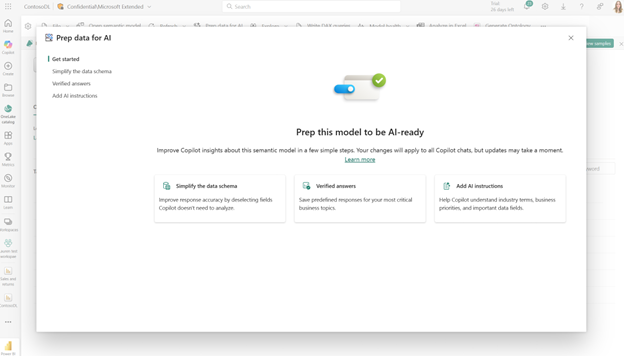
Power BI includes three features built for this: AI data schemas, verified answers and AI instructions. Find them under Prep data for AI in Power BI Desktop and the Power BI service.
Mark Approved Models for Copilot
Once a model is prepared, mark it as Approved for Copilot in the Power BI service. It signals to users and to Copilot that this model is ready for business questions.
Audit Row-Level Security and Permissions
Because Copilot inherits every permission, test row-level security with real user personas from each department. Remove stale workspace access and broad sharing before rollout, not after.
Pilot With One Department and Real Questions
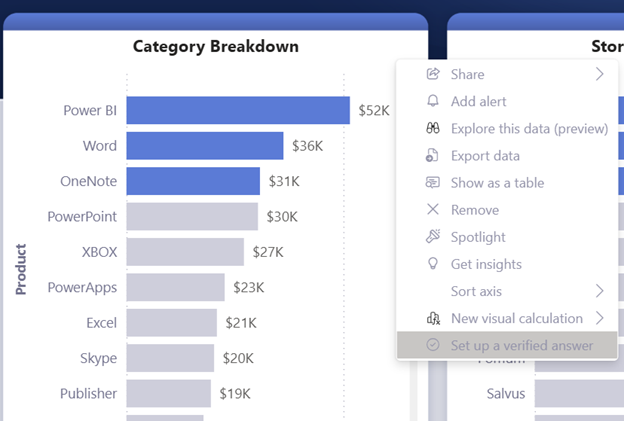
Start with a team whose questions you can predict, such as finance or sales operations. Check answers against known figures and turn the most common questions into verified answers.
Other FabCon Europe 2026 Announcements Worth Knowing
Beyond Fabric IQ, a few announcements stand out for Data & BI leaders.
Preview, coming months
Apps in Power BI
Pro, Premium Per User and Fabric capacity customers can build apps from a natural language description that accept inputs, write back data and support operational workflows, according to the Power BI team.
Preview
Data Engineering Agent
Plans and runs migrations, ETL and performance tuning within guardrails.
Generally available
Business Central Mirroring
Brings Dynamics 365 Business Central data straight into OneLake, a direct bridge between your enterprise applications and your analytics, per Microsoft’s OneLake announcements.
Preview
IQ Sharing in OneLake
Securely shares governed data and business context across teams, business units and partners.
Early look
Semantic Views
Define governed metrics where data lives in OneLake and reuse them across and beyond Fabric.
Coming
F0 Tier and On-Demand Billing
A zero-provisioned entry point with pay-as-you-go compute, lowering the barrier for smaller teams to start on Fabric.

How Cloud 9 Helps You Turn Fabric IQ Into Trusted Answers
Cloud 9 Infosystems is a Women and Minority owned Microsoft Designated Partner based in Downers Grove, near Chicago, Illinois, helping organizations across the USA build data foundations that AI can trust. We already explained how Microsoft Fabric unifies data and analytics for IT leaders. Fabric IQ is where that unified foundation starts paying off in everyday conversations.
Readiness Assessment
A semantic model readiness assessment across your Power BI tenant.stion.
Model Preparation
Consolidate models, configure AI instructions and verified answers and certify sources of truth.
Security and Governance
Audit row-level security, sensitivity labels and admin settings before rollout.
Copilot Integration
Connect Fabric IQ to your Copilot Cowork deployment and control spend with our Microsoft AI cost management playbook.
Ongoing Support
Expert Power BI support as your models and usage grow.
Explore our full Data & AI solutions to see how we build on Microsoft Fabric end to end.
Make Sure Copilot's Answers Are Ones You Would Stand Behind
Your users are about to start asking your data questions in plain English. Find out how ready your semantic models are for Fabric IQ.
Frequently asked questions
What is Fabric IQ in Microsoft Copilot?
Fabric IQ connects Microsoft Copilot Chat and Copilot Cowork to your Power BI reports and semantic models, so users can ask business questions in plain language and get answers grounded in your governed data. It became generally available at FabCon Europe 2026.
Does Fabric IQ in Copilot cost extra?
Microsoft says Copilot customers can use Fabric insights without additional AI token costs, and no extra Fabric capacity, F SKU or Premium Per User license is required for the plugin itself. Users still need Microsoft 365 Copilot Cowork access with usage-based billing.
Does Copilot respect Power BI row-level security?
Yes. Copilot queries Power BI as the signed-in user, so item permissions and row-level security continue to apply. Users cannot see data through Copilot that they cannot already see in Power BI.
Title: Is Fabric IQ turned on by default?
Yes. The “Fabric data available in M365 Copilot” setting in the Microsoft 365 admin center is enabled by default. Admins should review it alongside the Fabric admin portal setting “Share Fabric data with your Microsoft 365 services.”
What are the current limitations of Fabric IQ in Copilot Cowork?
Answers do not yet include citations to the source report, DLP is not currently supported in Cowork and paginated reports, dashboards and Fabric items such as lakehouses are not supported in the plugin.
How do I prepare Power BI semantic models for Copilot?
Use Power BI’s Prep data for AI features: AI data schemas, verified answers and AI instructions. Then mark the model as Approved for Copilot, consolidate duplicate models and audit row-level security before rollout.
What is the difference between Fabric IQ and Fabric data agents?
Fabric IQ provides business context to Copilot from your Power BI semantic models. Fabric data agents are conversational Q&A agents you build over up to five Fabric data sources, which can also be used by tools such as Copilot Studio and Microsoft Foundry.
Recent Posts

FabCon Europe 2026: What Fabric IQ and Data Agents Mean for Your Business
Microsoft 365 Copilot has reached 30 million paid seats, but licenses alone do not guarantee value. Learn how to measure adoption, track ROI, optimize usage, and right-size Copilot licensing before your next renewal.

30 Million Microsoft 365 Copilot Seats Later: Is Your Copilot License Paying Off?
Microsoft 365 Copilot has reached 30 million paid seats, but licenses alone do not guarantee value. Learn how to measure adoption, track ROI, optimize usage, and right-size Copilot licensing before your next renewal.

Measuring Generative AI ROI: A Practical Framework for 2026
Learn how to measure Generative AI ROI with a practical 2026 framework. Connect AI costs to business outcomes, track value, manage governance, and build a defensible case for scaling AI investments.

Join Us on the Journey to Transforming Futures - Contact Us!
Schedule a meeting with our experts or fill out the form for a free assessment of your environment today!


*Cloud 9 reserves the right for free assessment eligibility.