

Azure Virtual Desktop Regional Host Pools Are Now GA. Here Is Why Your Next Host Pool Should Be Regional.
Microsoft’s own multiregional design guidance for Azure Virtual Desktop puts two numbers side by side. In an active-active design, estimated recovery time is “near zero (no failover needed, both host pools serve users).” In an active-passive design, it is 15 to 60 minutes, depending on compute warm-up time. Microsoft is clear these are estimates, not guarantees, but the gap between them is the question every IT leader running AVD should be able to answer: if a region has a bad day, how long are my users without a desktop?
Regional host pools are now generally available, and they change what that answer can be. Microsoft’s documentation says, “we recommend that you create all new host pools as regional host pools for improved resiliency and data sovereignty.”
WHAT YOU WILL LEARN
Which failure regional host pools protect against, and which they leave to you
How to choose between active-active and active-passive designs
A checklist for adopting regional host pools in your own environment
THE SHORT VERSION
- Regional host pools are generally available; host pool metadata is stored in the Azure region you select
- They remove the shared geographical metadata dependency, so a problem in one region no longer has to affect host pools in another
- There are no functional differences for users or session hosts
- Regional and geographical objects cannot be mixed, so plan workspaces and application groups up front
- Microsoft recommends regional host pools for all new deployments
What Azure Virtual Desktop Regional Host Pools Change
Every host pool in Azure Virtual Desktop has metadata behind it: the configuration and state the service needs to broker connections. Until now, that metadata lived in a geographical database shared by the regions in a geography.
Microsoft’s What’s New entry describes the change: “With regional host pools, host pool metadata is stored in the selected Azure region instead of a geographical database shared across regions. This architecture helps improve resiliency by removing cross-region dependencies and limiting the impact of infrastructure issues to the affected region.”
In practical terms, the dependency removed is the shared geographical metadata database. Microsoft Learn is explicit that “there are no functional differences between the two types of host pool,” so your users, session hosts and management experience stay the same. What changes is the failure boundary. Storing metadata in your chosen region also lets you align it with your data sovereignty requirements.
The Hidden Risk in Single-Geography AVD
Many AVD designs that look multiregional on paper still share that one metadata dependency. Microsoft’s multiregional BCDR guidance states the risk plainly:
“A database or infrastructure problem in the region that hosts the geographical database affects host pools across all regions in that geography, even if those regions are otherwise healthy.”
You can deploy session hosts in two regions, replicate profiles and test failover, and still have both regions tied to one shared database. With regional host pools, the same guidance reads differently: “A control plane problem in the primary region doesn’t affect host pools in the secondary region because each region uses an independent database.”
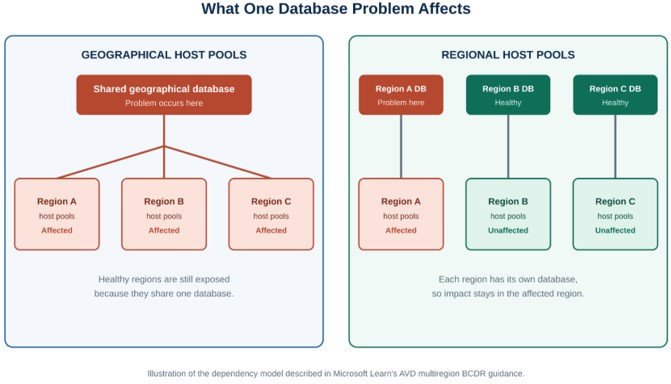
A shared geographical database exposes healthy regions to one region’s problem. Regional host pools keep the impact inside the affected region.
Not sure how many of your AVD host pools share a single point of failure?
Cloud 9 Infosystems reviews Azure Virtual Desktop designs for resilience, cost and user experience.
Regional vs Geographical Host Pools: Side by Side
| Geographical host pool | Regional host pool |
Where metadata lives | Geographical database shared across regions | Selected Azure region |
Shared geographical metadata dependency | Yes | Removed |
Impact of a database or infrastructure issue | Can affect host pools across the geography | Limited to the affected region |
Functional differences | None | None |
Data sovereignty control | Geography level | Aligned to the Azure region you select |
Microsoft recommendation | Existing deployments | All new host pools |
Two planning rules from Microsoft Learn: objects must share a deployment scope (“only objects with the same deployment scope can be associated together”), so regional application groups attach only to regional workspaces; and Microsoft has said it will deprecate creating new geographical host pools at a future date.
Active-Active vs Active-Passive: Choosing Your AVD Resilience Model
Regional host pools remove the shared metadata dependency. They do not choose your recovery model. Microsoft’s multiregional guidance describes two designs:
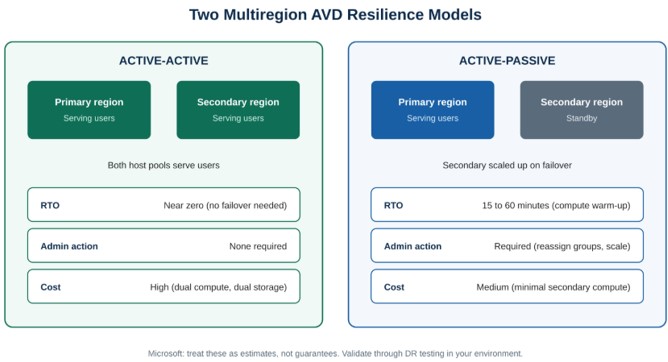
Microsoft cautions that these figures are estimates, not guarantees, and should be validated through disaster recovery testing.
| Active-active | Active-passive |
Estimated RTO (Microsoft estimate, not a guarantee) | Near zero (no failover needed, both host pools serve users) | 15 to 60 minutes, depending on compute warm-up time |
Estimated RPO | Seconds to minutes (Cloud Cache replication lag) | Seconds to minutes (Cloud Cache replication lag) |
Admin action during an event | None required | Required: reassign application groups and scale capacity |
Relative cost | High (dual compute, dual storage) | Medium (minimal secondary compute) |
Typical fit (our guidance) | Workflows that cannot pause, such as a call center or clinical workflow | Teams that can tolerate a short interruption, such as back-office users |
Microsoft’s guidance is to treat these figures as estimates and validate them through DR testing in your environment. The two models can also be combined: active-passive for most users, active-active only for the group that cannot wait.
In our conversations with manufacturing, healthcare and financial services teams running AVD, the first resilience question is rarely “which model?” It is “what exactly fails if the region goes down?” Answering that honestly, before choosing a model, is where good designs start. For a real-world AVD deployment, see how a financial services firm moved 60+ employees from RDS to Azure Virtual Desktop in a single weekend
What Regional Host Pools Do Not Cover
Microsoft manages the control plane. Per Microsoft: “The Azure Virtual Desktop control plane includes the web, broker, gateway, resource directory, and diagnostics services. Microsoft manages the control plane and supports regional failover… You don’t need to set up control plane redundancy.”
You manage everything around it:
- User profiles. FSLogix Cloud Cache replicates Profile and Office containers asynchronously between regions. Replication lag defines your recovery point.
- Session host capacity. In active-passive, secondary compute must be scaled up on failover.
- Identity and connectivity. Microsoft Entra ID is globally resilient, but Microsoft’s reference design also places Active Directory replicas and ExpressRoute or VPN gateways in both regions.
- One profile, one connection. “Only one process can open the same user profile file in Read Write mode,” so users should not connect to both host pools at the same time.
Recovery design also has to account for attacks, not just outages. See our guide to Azure Site Recovery in a ransomware world and our disaster recovery services.
AVD Regional Host Pool Adoption Checklist
New to AVD design? Start with our Azure Virtual Desktop implementation guide, then work through this list.
Before you build
- List every host pool and record its type (geographical or regional), region, workspace and application groups
- Confirm your target Azure region shows the Deployment scope option in the portal; it appears only in supported regions
- For each user group, document how much downtime it can tolerate and assign active-active or active-passive
Build
- Create new host pools with Deployment scope set to Regional (portal) or -DeploymentScope Regional (New-AzWvdHostPool)
- Create regional workspaces and application groups; they cannot be associated with geographical objects
- Do not plan an in-place conversion: Microsoft’s documentation says migrating existing geographical pools is not directly supported, so build alongside and check Microsoft’s latest guidance
Protect the layers around it
- Configure FSLogix Cloud Cache with storage in both regions and confirm the provider order in each region
- Place Active Directory replicas and ExpressRoute or VPN gateways in both regions where your design needs them
- For active passive, write the runbook for reassigning users to the secondary application group and scaling compute
- Prevent the same user from connecting to both host pools at once
Validate
- Run a failover drill and record your actual RTO and RPO against Microsoft’s estimates
- Repeat the drill on a schedule and after major environment changes
The Bottom Line for IT Leaders
Regional host pools do not make AVD more complicated. They remove a dependency most teams did not know they had, and because there are no functional differences to trade off, the default for new AVD deployments is now clear. The real work is the decision around it: how much downtime your users can absorb, how profiles move between regions, and whether anyone has tested the failover. Regional host pools are one piece of broader Azure infrastructure modernization, and if you would rather have the design run day to day, that is what our Microsoft cloud managed services cover.
Microsoft Resources Referenced
Frequently Asked Questions
What are Azure Virtual Desktop regional host pools?
A host pool type that stores its metadata in the Azure region you select, instead of in a geographical database shared across regions. This removes the shared geographical metadata dependency and limits the impact of infrastructure issues to the affected region.
Are regional host pools generally available?
Yes. Microsoft’s What’s New page for Azure Virtual Desktop states that regional host pools are generally available. Availability is by Azure region, and the Deployment scope option appears only in supported regions, so confirm yours in the portal.
Do regional host pools change the user experience?
No. Microsoft states there are no functional differences between regional and geographical host pools.
What is the difference between regional and geographical host pools?
Where the metadata lives. Geographical host pools share a database across the regions in a geography. Regional host pools keep metadata in the selected region, so a problem in one region does not have to affect host pools in another.
Can I mix regional and geographical objects?
No. Only objects with the same deployment scope can be associated, so regional application groups attach to regional workspaces and geographical application groups to geographical workspaces.
Should I choose active-active or active-passive?
Base the choice on what downtime costs your business. Microsoft estimates near-zero recovery time for active-active and 15 to 60 minutes for active-passive, with higher cost for active-active. These are estimates, not guarantees, so validate them with disaster recovery testing.
Do I still need FSLogix Cloud Cache?
For multiregional designs, yes. Microsoft’s reference architecture uses it to replicate profile and Office containers across regions. Regional host pools address the metadata dependency, not profile data.
Do I need to build control plane redundancy myself?
No. Microsoft manages the control plane and supports regional failover. You are responsible for the layers around it: session hosts, profiles, identity and connectivity.
Find out whether your Azure Virtual Desktop environment would survive a regional outage.
In a consultation with Cloud 9 Infosystems, we review your host pool layout, profile storage and failover approach against Microsoft’s multiregional guidance, and show you what to fix first. We are a Microsoft Azure Expert MSP based in Downers Grove, Illinois.
Recent Posts

Azure Virtual Desktop Regional Host Pools Are Now GA. Here Is Why Your Next Host Pool Should Be Regional.
Azure Virtual Desktop regional host pools are now generally available. Learn how they improve resiliency, reduce shared regional dependencies, support data sovereignty, and help IT teams build stronger AVD disaster recovery designs.

Generative AI Data Security: How to Prepare Microsoft 365 Before You Roll Out Copilot
Generative AI data security starts with securing the data Microsoft 365 Copilot can access. Learn how to fix oversharing, protect sensitive content, control AI use and prepare your Microsoft 365 environment for a safer Copilot rollout.

FabCon Europe 2026: What Fabric IQ and Data Agents Mean for Your Business
Microsoft 365 Copilot has reached 30 million paid seats, but licenses alone do not guarantee value. Learn how to measure adoption, track ROI, optimize usage, and right-size Copilot licensing before your next renewal.

Join Us on the Journey to Transforming Futures - Contact Us!
Schedule a meeting with our experts or fill out the form for a free assessment of your environment today!


*Cloud 9 reserves the right for free assessment eligibility.